How to Choose the Right Keyboard Switches – Complete Guide
Published: 16 Apr 2026
How to Choose the Right Keyboard Switches is important because keyboard switches are the core components that determine how a keyboard feels, sounds, and responds when you press a key. Whether you are building a gaming setup, working from home, or typing for long hours, choosing the right keyboard switches can make a huge difference in comfort, speed, and accuracy. Many users struggle with loud keyboards, slow response times, or finger fatigue during long typing sessions. The right switch can solve these problems.
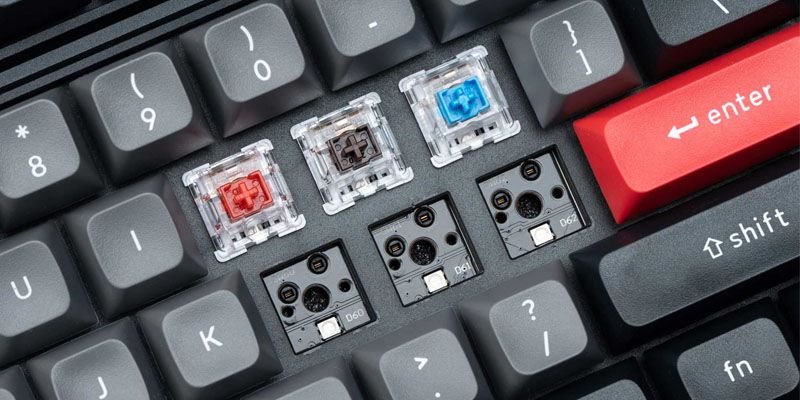
In the world of mechanical keyboards, switches come in different types, each designed for a specific experience. Some are smooth and quiet. Others provide tactile feedback or a noticeable click. In this guide on how to choose the right keyboard switches, you will learn how keyboard switches work, the main types available, and how to choose the best option for gaming, office work, programming, and everyday typing. By the end, you will know exactly which keyboard switch fits your needs.
1. What Are Keyboard Switches and Why Do They Matter
Keyboard switches are the mechanical or electronic components beneath each keycap that register your keystrokes. They determine how a key feels, how much pressure is needed, and how quickly the input is recognized. Choosing the right switch affects your typing comfort, speed, and accuracy, whether you’re gaming, working from home, or studying. Understanding switches helps you select a keyboard that enhances performance, reduces fatigue, and matches your personal preference
1.1 Definition of Keyboard Switches
Keyboard switches are the small mechanical or electronic components located under each key on a keyboard. They are responsible for registering a key press and sending that input to the computer. In simple terms, keyboard switches control how a keyboard feels, sounds, and responds when you type or press a key.
Every time you press a key, the switch beneath it activates and completes an electrical signal. This signal tells the computer which key was pressed. The design and quality of the switch directly affect the typing experience, including how much pressure is needed, how far the key moves, and how quickly the input is registered.
1.2 How Keyboard Switches Work
When a key is pressed, the switch mechanism moves downward until it reaches a specific point called the actuation point. At that moment, the keyboard sends the input signal to the computer.
The process generally works like this:
- A user presses a key.
- The switch stem moves downward.
- The internal contacts connect or trigger a sensor.
- The keyboard controller registers the input.
- The computer receives the keystroke.
High-quality switches reduce latency, meaning the key press is registered faster. This is especially important for gamers or professionals who need precise and responsive input.
1.3 Key Parts That Make Up Keyboard Switches
Most keyboard switches contain several internal components that influence performance and durability.
Common switch components include:
- Stem: The central moving part that connects to the keycap.
- Spring: Controls how much force is required to press the key.
- Housing: The outer shell that holds all components together.
- Metal contacts or sensors: Detect the key press and send the signal.
These parts determine the switch’s build quality, durability, and responsiveness.
1.4 Why Keyboard Switches Matter for the Typing Experience
Keyboard switches have a huge impact on how comfortable and efficient typing feels. Small differences in key travel, resistance, and feedback can significantly change the experience.
For example:
Office Workers (Work-From-Home Setup)
Many professionals in the US spend 6–8 hours typing emails, documents, or reports. Switches with smooth actuation and ergonomic design help reduce finger fatigue and wrist strain.
Students and Writers
Students who write essays or research papers benefit from switches that provide tactile feedback. This helps improve typing accuracy and reduces mistakes.
Gamers
Gamers prefer switches with fast response and low latency. Quick actuation ensures that every key press registers instantly during competitive gameplay.
1.5 Key Features That Define Keyboard Switch Performance
Different keyboard switches vary in several technical aspects that influence performance.
Important features include:
- Actuation Force: The pressure required to register a key press
- Key Travel: The distance a key moves when pressed
- Feedback: Whether the key provides tactile or audible feedback
- Latency: The delay between pressing a key and the computer receiving the input
- Durability: How many keystrokes the switch can handle over time
- Key Rollover: The ability to register multiple simultaneous key presses
For example, N-key rollover allows gamers to press many keys at once without input errors, which is critical for fast-paced games.
1.6 Comparison: Mechanical vs Membrane Keyboard Switches
| Feature | Mechanical Switches | Membrane Switches |
| Typing Experience | Precise and responsive | Soft and less defined |
| Key Travel | Longer and more noticeable | Shorter and mushy |
| Build Quality | Durable and premium | Lower-cost design |
| Latency | Faster input response | Slightly slower |
| Key Rollover | Often supports N-key rollover | Usually limited |
| Lifespan | 50–100 million keystrokes | 5–10 million keystrokes |
Mechanical key switches are generally preferred by gamers, programmers, and heavy typists because they provide better typing accuracy and durability. Membrane switches, however, are commonly found in budget keyboards used in offices or schools.
1.7 Real-Life Example of Keyboard Switch Impact
on a Software Developer Working Remotely in the United States. They type thousands of lines of code every day. A keyboard with poor switches can cause typing fatigue, missed keystrokes, or slow input response.
On the other hand, a keyboard with high-quality switches offers:
- Smooth keystrokes
- Reliable key rollover for shortcuts
- Reduced typing strain
- Faster response with minimal latency
This is why many professionals carefully choose keyboards based on switch technology.
2. Types of Keyboard Switches
Keyboard switches come in several types, and each one creates a different typing experience. The type of switch determines how a key feels when pressed, how much sound it produces, and
how quickly the input is registered. These differences affect productivity, gaming performance, and long-term comfort.
Most modern keyboards use three primary switch categories. These include linear, tactile, and clicky switches. Each type is designed for specific use cases such as gaming, office work, or heavy typing.
2.1 Linear Keyboard Switches
Linear switches move straight up and down without any tactile bump or clicking sound. The keystroke feels smooth from top to bottom. Because of their smooth motion and fast actuation, linear switches often provide lower latency and faster response times.
Key characteristics of linear switches:
- Smooth and consistent keystrokes
- No tactile feedback
- Quiet operation compared to clicky switches
- Faster response for rapid input
- Typically preferred for gaming setups
Real-life scenario
In the United States, many competitive gamers prefer linear switches for fast-paced games like first-person shooters. When pressing multiple keys quickly, the keyboard registers inputs instantly. This works well with N-key rollover, allowing several keys to be pressed simultaneously without missing commands. For example, a gamer using a mechanical keyboard with linear switches can perform rapid movements and actions without delays.
2.2 Tactile Keyboard Switches
Tactile switches provide a small bump during the key press. This bump indicates that the key has reached its actuation point, meaning the input has been registered. The feedback helps users type more accurately without pressing the key all the way down.
Key characteristics of tactile switches:
- Noticeable tactile bump
- Balanced typing experience
- Moderate sound level
- Improved typing accuracy
- Comfortable for long typing sessions
Real-life scenario
Many office workers in the US who work from home prefer tactile switches. These switches provide feedback without being too loud. The bump helps typists know when the key press is registered, reducing unnecessary force and improving ergonomic design benefits. Students and writers also enjoy tactile switches because they help maintain typing rhythm during long assignments or reports.
2.3 Clicky Keyboard Switches
Clicky switches include both a tactile bump and a distinct clicking sound when pressed. These switches are designed to give strong feedback for each keystroke. They are often used by people who enjoy the traditional feel of older mechanical keyboards.
Key characteristics of clicky switches:
- Audible clicking sound
- Strong tactile feedback
- Precise typing feel
- Higher noise levels
Real-life scenario
Some programmers and writers in the US prefer clicky switches because they create a satisfying typing sound and help maintain consistent typing speed. However, they are not ideal for shared office environments due to the noise level. For example, using clicky switches during a Zoom meeting in a quiet home office might create noticeable background noise.
2.4 Optical Keyboard Switches
Optical keyboard switches use light-based actuation instead of traditional metal contact points. Instead of two metal parts touching to register a key press, these switches use an infrared light beam inside the keyboard. When a key is pressed, the switch stem blocks or triggers the light signal, and the keyboard immediately registers the input.
Because there is no physical electrical contact, optical switches reduce friction and mechanical wear. This design improves durability and lowers input latency, which is why many modern gaming keyboards use optical technology.
Key characteristics of optical switches
- Light-based input detection
- Extremely fast response time
- Reduced input latency
- Longer lifespan compared to traditional switches
- Smooth key travel and consistent actuation
Real-life scenario
Many competitive gamers in the US prefer optical switches because of their fast response speed. In games that require quick reactions—such as first-person shooters or esports titles milliseconds can affect performance.
Optical switches also support advanced keyboard features such as high-speed key rollover, ensuring that multiple keys can be pressed at once without missed inputs.
For example, a gamer performing fast keyboard commands during gameplay benefits from the faster signal processing that optical switches provide.
2.5 Hall Effect Keyboard Switches
Hall Effect keyboard switches use magnetic sensing technology to detect key presses. Instead of physical contact or light sensors, these switches rely on magnets and magnetic field sensors to measure the key’s position.
When a key moves downward, the magnetic field changes. The keyboard detects this change and registers the keystroke. Because there is no physical contact between electrical components, these switches are extremely durable and precise.
Key characteristics of Hall Effect switches
- Magnetic sensing technology
- Adjustable actuation points in some keyboards
- Extremely high durability
- Smooth and consistent keystrokes
- Very low latency
Real-life scenario
Many programmers, keyboard enthusiasts, and professional gamers in the US are starting to use Hall Effect keyboards because of their advanced customization features.
Some Hall Effect keyboards allow users to adjust the actuation distance, meaning the key can register input earlier or later depending on user preference. This can improve the typing experience for different tasks.
For example:
- A gamer may set shorter key travel for faster reactions.
- A writer or student may prefer longer key travel for more control and comfort.
This flexibility makes Hall Effect switches one of the most advanced technologies in modern keyboard design.
2.6 Comparison of Modern Keyboard Switch Technologies
| Switch Type | Technology | Latency | Durability | Best Use Case |
| Linear | Mechanical contact | Low | High | Gaming |
| Tactile | Mechanical contact | Low | High | Office work |
| Clicky | Mechanical contact | Low | High | Typing enthusiasts |
| Optical | Light-based actuation | Very low | Very high | Competitive gaming |
| Hall Effect | Magnetic sensing | Extremely low | Extremely high | Advanced users, esports |
2.7 How Switch Types Affect Keyboard Performance
Different keyboard switches influence several important factors that affect usability and performance.
Important performance factors include:
- Typing experience: Smooth, tactile, or clicky feedback
- Key travel distance: How far the key moves before actuating
- Latency: Speed of input response
- Build quality: Durability and reliability of switches
- Key rollover: Ability to register multiple simultaneous key presses
- Noise level: Quiet or loud typing sound
For gamers, faster actuation and lower latency are important. For office workers and students, comfort and noise control matter more.
2.8 Choosing the Right Switch Type
The best switch type depends on how you use your keyboard daily.
For example:
- Gamers benefit from linear switches due to faster response and reduced latency.
- Office professionals prefer tactile switches for balanced feedback and comfort.
- Students and writers may enjoy tactile or clicky switches for better typing rhythm.
Switch selection also affects ergonomic design and long-term comfort. Choosing the right switch can reduce finger fatigue, improve accuracy, and make typing more enjoyable.
3. Keyboard Switch Components and Technical Specifications
Keyboard switch components include the stem, spring, housing, and electrical contacts or sensors. These parts control how a key moves, how much pressure is needed, and how quickly the input is registered. Technical specifications like actuation force, key travel, and latency directly affect typing comfort and keyboard performance. Main Components of Keyboard Switches.
Most mechanical keyboard switches share a similar internal structure. Each component plays a role in how the key feels and performs.
3.1 Stem
The stem is the central moving part of the switch. It connects the switch to the keycap and moves up and down when a key is pressed. Different stem designs determine the type of switch:
- Linear stems move smoothly.
- Tactile stems create a small bump.
- Clicky stems produce both a bump and a sound.
The stem also influences key travel distance, which affects how deeply a key must be pressed before the input is detected.
3.2 Spring
The spring sits inside the switch and controls the resistance of the key press. When a key is pressed, the spring compresses and then pushes the key back to its original position. Spring strength determines the actuation force, or how much pressure is required to trigger a keystroke.
For example:
- Gamers in the US often prefer lighter springs because they allow faster repeated keystrokes and lower fatigue.
- Office workers and writers may prefer slightly heavier springs for better typing control and accuracy.
3.3 Housing
The housing is the outer shell that holds the internal components together. It usually consists of two parts:
- Upper housing
- Lower housing
The material used for the housing affects the switch’s build quality, durability, and sound profile. Higher-quality housings reduce wobble and improve the overall typing stability. This creates a smoother and more consistent typing experience
3.4 Electrical Contacts or Sensors
The internal contact system registers the keystroke when the switch reaches its actuation point. Depending on the technology, switches use different detection methods:
- Mechanical contacts connect metal pieces.
- Optical switches use light sensors.
- Hall Effect switches use magnetic sensors.
These systems influence the latency of the keyboard, meaning how quickly the key press is recognized by the computer. Lower latency is especially important for competitive gaming and fast typing tasks.
4. Key Technical Specifications of Keyboard Switches
Besides physical components, switches also have performance specifications that affect usability.
4.1 Actuation Force
Actuation force refers to the amount of pressure required to register a keystroke.
- Lower force: easier to press keys quickly
- Higher force: more resistance and control
For example, a student typing essays or research papers may prefer a moderate actuation force to reduce typing fatigue during long study sessions.
4.2 Key Travel Distance
Key travel is the distance a key moves from its starting position to the bottom. Typical mechanical keyboards have a key travel distance of around 3.5–4.0 mm.
Key travel influences comfort and typing rhythm.
- Shorter travel can improve speed.
- Longer travel can improve typing precision.
4.3 Actuation Point
The actuation point is the position where the keyboard registers the keystroke. If a switch acts earlier, users can type faster without pressing the key fully. This is beneficial for gamers and programmers who need quick response times.
4.4 Latency and Response Time
Latency measures the delay between pressing a key and the computer registering that input. Lower latency means faster response. This is important in situations like:
- Online gaming competitions
- Fast coding sessions
- Rapid typing tasks
Modern gaming keyboards often optimize switches to reduce latency for better performance.
4.5 Key Rollover Capability
Key rollover determines how many keys can be pressed at the same time without losing input. For example:
- N-key rollover allows unlimited simultaneous key presses.
- Lower rollover keyboards may miss inputs during complex commands.
Gamers frequently rely on high-key rollover to perform multiple actions at once.
4.6 Comparison of Important Switch Specifications
| Specification | What It Means | Impact on Typing Experience | Best For |
| Actuation Force | Pressure is needed to press the key | Affects comfort and fatigue | Office workers, writers |
| Key Travel | Distance key moves | Influences typing rhythm | Students, programmers |
| Actuation Point | Where the key registers input | Improves speed and efficiency | Gamers |
| Latency | Input response time | Faster reaction during typing or gaming | Competitive gaming |
| Key Rollover | Multiple key input capability | Prevents missed inputs | Gaming and programming |
4.7 Why These Components Matter in Real Use
The combination of switch components and specifications directly affects real-world performance. For example:
- Remote workers in the US benefit from switches with balanced actuation force and ergonomic design for comfortable long-term typing.
- Students need consistent key travel and reliable input for writing assignments.
- Gamers require low latency and high key rollover to ensure precise gameplay.
High-quality keyboard switches with strong build quality provide smoother operation, better durability, and a more enjoyable typing experience. Understanding these components helps users choose keyboards that match their daily tasks, whether for productivity, studying, or gaming.
5. Popular Keyboard Switch Brands and Their Characteristics
Popular keyboard switch brands include Cherry MX, Gateron, Kailh, Razer, and Logitech. Each brand offers unique switch designs that affect typing feel, key travel, durability, and responsiveness. Choosing the right brand can improve typing comfort, gaming performance, and long-term keyboard reliability.
5.1 Cherry MX Switches Overview
Cherry MX switches are among the most well-known and widely used mechanical keyboard switches. They are manufactured in Germany and are often considered the industry standard due to their reliability and consistent performance. Cherry MX switches are popular because of their high build quality and long lifespan, often rated for 50–100 million keystrokes.
Common Cherry MX switch types include:
- Cherry MX Red – Linear switch ideal for gaming
- Cherry MX Brown – Tactile switch suitable for office work and typing
- Cherry MX Blue – Clicky switch preferred by typists who enjoy audible feedback
Many office professionals in the US use keyboards with Cherry MX Brown switches because they offer a balanced typing experience. The tactile feedback helps improve accuracy while maintaining moderate noise levels in work environments.
5.2 Gateron Keyboard Switches
Gateron switches are widely known for their smooth keystrokes and affordable pricing. Many keyboard enthusiasts consider them smoother than some traditional mechanical switches. These switches are commonly used in both budget and premium mechanical keyboards.
Key features of Gateron switches include:
- Smooth key travel
- Lower manufacturing cost
- Wide variety of switch types
- Good durability ratings
A college student building a budget mechanical keyboard setup may choose Gateron switches because they provide a great typing experience without the higher cost of premium switches. Gamers also appreciate Gateron linear switches for their smooth and consistent actuation.
5.3 Kailh Mechanical Switches
Kailh is another major manufacturer of mechanical keyboard switches and is known for producing innovative switch designs. The company produces both standard mechanical switches and specialized switches for gaming keyboards. Kailh also introduced the box switch design, which helps protect internal components from dust and moisture.
Key characteristics of Kailh switches:
- Wide variety of switch options
- Durable switch construction
- Dust-resistant designs
- Competitive pricing
A remote software developer in the US may prefer Kailh tactile switches because they offer a strong tactile bump that improves typing feedback while coding for long hours.
5.4 Razer Optical Switches
Razer developed its own optical keyboard switches designed specifically for gaming performance. Instead of using metal contacts, these switches rely on light-based actuation, which reduces physical wear and improves response speed. Optical switches provide extremely low latency, making them ideal for competitive gaming environments.
Key features of Razer optical switches:
- Light-based input detection
- Faster actuation compared to traditional switches
- Reduced debounce delay
- High durability
A competitive esports player in the US benefits from optical switches because the keyboard registers key presses almost instantly. This quick response improves reaction time in fast-paced games.
5.5 Logitech Romer-G Switches
Logitech developed Romer-G switches for its gaming keyboards to provide faster actuation and improved lighting performance. These switches feature a unique stem design that allows better integration with keyboard lighting systems while maintaining reliable performance.
Important characteristics include:
- Shorter actuation distance
- Faster response time
- Quiet typing operation
- Strong ergonomic design for long gaming sessions
Many streamers and gamers prefer Logitech keyboards because the Romer-G switches provide fast response and comfortable typing during long gaming sessions.
5.6 How Different Brands Compare in Quality and Feel
Each keyboard switch brand focuses on different priorities, such as smoothness, durability, or gaming performance. Choosing the right one depends on how the keyboard will be used.
| Brand | Key Strength | Typing Experience | Latency | Best For |
| Cherry MX | Premium build quality | Consistent and reliable | Low | Office work, typing |
| Gateron | Smooth key travel | Soft and smooth feel | Low | Budget mechanical keyboards |
| Kailh | Innovative designs | Strong tactile feedback | Low | Custom keyboards |
| Razer | Optical technology | Extremely fast response | Very low | Competitive gaming |
| Logitech Romer-G | Fast actuation | Quiet and comfortable | Very low | Gaming setups |
6. Common Keyboard Switch Problems and Troubleshooting
Even the best keyboard switches can experience issues over time. Understanding common problems and how to fix them helps maintain a smooth typing experience, prevents frustration, and prolongs the lifespan of your keyboard. Whether you’re a gamer, student, or office worker, troubleshooting switch problems ensures consistent performance.
6.1 Keyboard Switch Not Registering Keystrokes
When a key press doesn’t register on the computer, it could be due to:
- Dust or debris is blocking the switch mechanism
- Loose or improperly seated keycap
- Faulty switch contacts or damaged PCB
Troubleshooting tips:
- Remove the keycap and clean around the switch with compressed air
- Test the key on another device or keyboard tester
- For mechanical switches, consider replacing the faulty switch if cleaning doesn’t work
6.2 Double Typing or Key Chatter Issue
Key chatter occurs when a single key press registers multiple times. This problem is common in older or heavily used mechanical switches.
Causes:
- Worn-out switch contacts
- Dirt or debris inside the switch
- Electrical interference
Solutions:
- Clean the switch thoroughly
- Update keyboard firmware (if supported)
- Replace the switch if the problem persists
6.3 Sticky or Unresponsive Keyboard Switch
A key may feel sticky or unresponsive due to:
- Dirt, dust, or spilled liquids inside the switch
- Misaligned keycap
- Degraded spring tension
Fixes:
- Remove the keycap and clean the switch with isopropyl alcohol
- Check for proper alignment and reset the keycap
- Replace the spring or the entire switch if cleaning doesn’t help
6.4 Loud Switch Noise Problems
Mechanical keyboards can be noisy, especially with clicky switches. Excessive noise may disturb coworkers or housemates.
Solutions to reduce noise:
- Use O-rings or dampeners under keycaps to soften bottom-out sounds
- Switch to quieter alternatives, such as linear or silent switches
- Lubricate switch components for smoother, quieter operation
6.5 When to Replace a Keyboard Switch
Even with proper care, switches eventually wear out. Signs it’s time to replace a switch include:
- Frequent key chatter or double-typing
- Keys not registering after cleaning
- Excessive stiffness or stickiness
- Audible degradation or inconsistent feedback
Replacement options:
- Hot-swappable keyboards: Easily swap switches without soldering
- Soldered switches: Requires desoldering and replacement
By understanding these common problems and troubleshooting steps, users can maintain optimal keyboard performance, improve typing comfort, and extend the life of their switches. Proper maintenance is especially important for gamers, students, and remote workers who rely on accurate and responsive keyboards every day.
Conclusion
Choosing the right keyboard switches is essential for improving your typing experience, productivity, and gaming performance. Whether you are a gamer looking for low-latency linear switches, an office worker seeking quiet tactile switches, or a student typing for hours, understanding switch types, components, and technical specifications helps you make the best choice.
High-quality switches with proper key travel, ergonomic design, and durable build quality ensure comfort and long-lasting performance. Optical and Hall Effect switches offer modern alternatives for faster response and extended lifespan, while popular brands like Cherry MX, Gateron, Kailh, Razer, and Logitech provide reliable options for every use case.By considering factors such as actuation force, key rollover, latency, and noise level, you can select the ideal keyboard switches to match your needs. Investing in the right switches not only enhances speed and accuracy but also reduces fatigue during long typing sessions. Upgrade your keyboard today and enjoy a smoother, more efficient, and personalized typing or gaming experience.
The three main types are linear (smooth keystrokes), tactile (small bump feedback), and clicky (bump plus audible click). Linear is popular for gaming, tactile for typing, and clicky for feedback enthusiasts.
Linear and optical switches are ideal for gaming due to low latency, fast actuation, and high key rollover. They allow quick, repeated keystrokes for competitive play.
Tactile switches provide feedback for more accurate typing, while linear switches are smoother and faster. Choose tactile for typing comfort and linear for speed-intensive tasks like gaming.
The quietest switches are silent linear, tactile silent, or optical switches. They reduce noise while maintaining smooth keystrokes, perfect for shared offices or home setups.
Mechanical switches last 50–100 million keystrokes, optical switches often exceed 100 million, while membrane switches last 5–10 million. High-quality switches can last many years of heavy use.
Yes, many keyboards are hot-swappable for easy switch replacement, or soldered for advanced customization. Users can change actuation force, travel, or sound profile to suit preferences.
Professional gamers usually use linear or optical switches for fast, smooth, and low-latency keystrokes. Hall Effect switches are also popular for advanced custom setups.

- Be Respectful
- Stay Relevant
- Stay Positive
- True Feedback
- Encourage Discussion
- Avoid Spamming
- No Fake News
- Don't Copy-Paste
- No Personal Attacks
- Be Respectful
- Stay Relevant
- Stay Positive
- True Feedback
- Encourage Discussion
- Avoid Spamming
- No Fake News
- Don't Copy-Paste
- No Personal Attacks
