Types of Computer Keyboards: Complete Guide to Choose Best One
Published: 9 Apr 2026
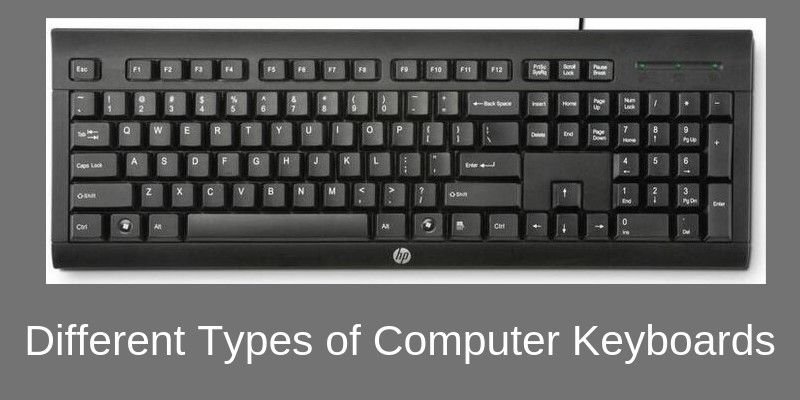
The computer keyboard is one of the most important input devices, allowing users to type text and enter commands and data on the monitor screen. It is the best interface between humans and computers, allowing users to connect with the system. In the 1860s, the idea for a device that looked like a typewriter and had a QWERTY key arrangement was developed.
When we explore the types of computer keyboards, we can see how technology has evolved to meet different user needs. From mechanical and membrane keyboards to ergonomic and wireless options, each type is designed for specific tasks and comfort levels.
In earlier times, keyboards used to have basic layouts that were similar to typewriters, and now they have become complex and feature-rich modern designs. Computer keyboards play a vital role in many areas, including business, education, gaming, and everyday personal use. Understanding the different types of computer keyboards helps users choose the right one based on their work style, preferences, and performance needs.
1. Key Components of a Computer Keyboard
- Alphanumeric Keys: The fundamental keys used to enter text, representing letters and numbers.
- Function Keys (F1–F12): Keys in the top row that perform a variety of tasks, frequently acting as shortcuts for commands or particular tasks.
- Modifier keys (Shift, Ctrl, Alt): These keys increase command choices by changing how other keys behave when tapped in combination.
- Numeric Keypad: An additional set of keys for entering numbers that resembles a calculator and is usually located on the right.
- Special keys: Keys have particular purposes for navigation, text editing, and system control (Enter, Backspace, Tab).
- Arrow keys (Up, Down, Left, Right): Make navigating documents, menus, and interfaces easier.
- Escape key (Esc): It is used to reverse a command and return to the previous command.
2. Different Types of Keyboards
Below are some types of keyboard in computers.
1.1 QWERTY Keyboards
QWERTY keyboards are the most commonly used keyboard layout worldwide, designed to improve typing speed, accuracy, and productivity. Named after the first six letters on the top row, this layout has been the global standard since the typewriter era and is now used in computers, laptops, and other digital devices. QWERTY keyboards are ideal for students, professionals, writers, programmers, and everyday users due to their familiar design and universal compatibility.
Key Features :
- Globally recognized standard layout
- Enhances typing speed and accuracy
- Easy for beginners to learn
- Compatible with major operating systems
- Available in mechanical and membrane versions
1.2 Wired Keyboards
Wired keyboards are one of the most reliable and widely used computer input devices for both home and office environments. These keyboards connect directly to a computer via a USB or dedicated cable, ensuring a stable and lag-free typing experience. Unlike wireless models, wired keyboards do not require batteries or charging, making them a low-maintenance and cost-effective option. They are especially preferred by gamers and professionals who need consistent performance without interruptions in connectivity. If you are looking for a durable, affordable, and high-performance keyboard, a wired keyboard is a practical choice.
Key Features:
- Stable and uninterrupted connection
- No battery or charging required
- Budget-friendly option
- Ideal for gaming and office work
1.3 Numeric Keypads
Numeric keypads are specialized keyboards designed for fast and accurate number typing. They are commonly used in accounting, banking, data entry, and financial management tasks where quick calculations are required. A dedicated numeric keypad improves productivity by allowing users to enter numbers efficiently without switching keyboard modes. Many professionals prefer external numeric keypads for laptops to enhance workflow and accuracy. If your work involves spreadsheets, bookkeeping, or financial software, a numeric keypad is an essential productivity tool.
Key Features:
- Speeds up data entry
- Perfect for accounting and finance
- Compact and portable design
- Improves calculation accuracy
1.4 Ergonomic Keyboards
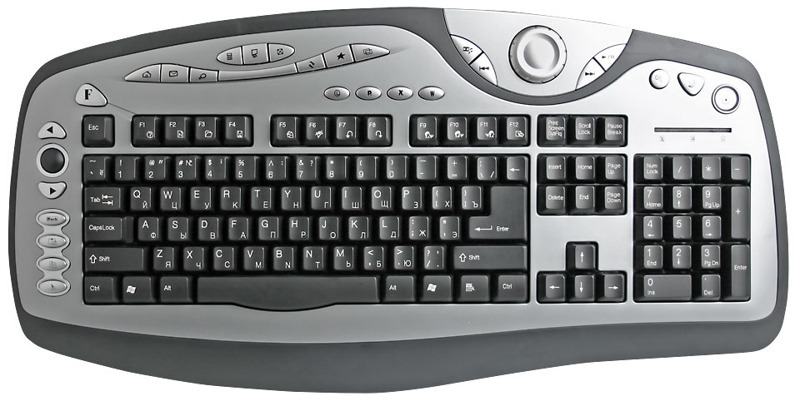
Ergonomic keyboards are designed to reduce wrist strain, hand fatigue, and typing discomfort. Featuring split, curved, or angled layouts, these keyboards promote natural hand positioning and better posture. They are highly recommended for professionals who spend long hours typing, such as writers, programmers, and office workers. Using an ergonomic keyboard can help prevent repetitive strain injuries (RSI) and improve overall typing comfort. If you prioritize health, comfort, and long-term productivity, investing in an ergonomic keyboard is a smart decision.
Key Features:
- Reduces wrist and hand strain
- Encourages natural typing posture
- Ideal for long working hours
- Improves comfort and productivity
1.5 Wireless Keyboards
Wireless keyboards offer flexibility and convenience by eliminating the need for cables. They connect via USB receivers or Bluetooth, creating a clean, clutter-free workspace. These keyboards are perfect for remote workers, students, and users who prefer mobility. Wireless keyboards are lightweight, portable, and compatible with multiple devices. If you want a modern desk setup with greater freedom of movement, a wireless keyboard is an excellent option.
Key Features:
- Cable-free convenience
- Portable and flexible
- Easy to connect
- Perfect for home and remote work
1.6 USB Keyboards
USB keyboards are plug-and-play devices that connect directly to a computer via a USB port. They are widely compatible with desktops, laptops, and other devices, making them one of the most popular keyboard types. USB keyboards require minimal setup and provide reliable performance for everyday tasks. Whether for office use, educational purposes, or general browsing, USB keyboards are a simple and dependable solution.
Key Features:
- Quick installation
- Broad compatibility
- Stable performance
- Affordable and practical
1.7 Bluetooth Keyboards
Bluetooth keyboards are wireless keyboards that connect to devices without a USB receiver. They are compatible with laptops, tablets, smartphones, and smart TVs, making them ideal for multi-device users. Bluetooth keyboards are popular among travelers and remote workers due to their lightweight and compact design. If you need a keyboard that works seamlessly across multiple devices, a Bluetooth keyboard is a versatile and efficient choice.
Key Features:
- Connects to multiple devices
- No USB dongle required
- Lightweight and portable
- Ideal for travel and mobility
1.8 Magic Keyboards
Magic keyboards are premium slim keyboards known for their smooth, responsive typing experience and elegant design. Popular among Apple users, they offer advanced features like rechargeable batteries and optimized key mechanisms for precise typing. These keyboards combine style, comfort, and performance, making them ideal for professionals and creatives who value aesthetics and functionality.
Key Features:
- Sleek and modern design
- Smooth and quiet typing
- Rechargeable battery
- Optimized performance
1.9 Backlit Keyboards
Backlit keyboards feature illuminated keys that improve visibility in low-light environments. They are widely used by gamers, programmers, and users who work at night. Many backlit keyboards come with adjustable brightness levels and RGB lighting options for customization. If you often work in dim settings or prefer a stylish setup, a backlit keyboard enhances both usability and appearance.
Key Features:
- Improved visibility in the dark
- Adjustable lighting options
- Stylish design
- Ideal for night use
1.10 Gaming Keyboards
Gaming keyboards are designed for speed, durability, and precision. They often include mechanical switches, RGB lighting, programmable keys, and anti-ghosting technology. These features enhance gameplay performance and provide faster response times. Competitive gamers prefer gaming keyboards for their tactile feedback and long-lasting build quality. If you want better control and performance during gameplay, a gaming keyboard is essential.
Key Features:
- Fast response time
- Customizable keys
- Durable build quality
- Enhanced gaming performance
1. 11 Flexible Keyboards
Flexible keyboards are made from soft, bendable materials that allow them to be rolled or folded. They are lightweight, portable, and often water-resistant, making them suitable for travel or outdoor use. These keyboards are easy to store and clean, offering convenience for users who need mobility and durability in different environments.
Key Features:
- Rollable and portable
- Water-resistant options
- Easy to clean
- Travel-friendly design
1. 12 Membrane Keyboards
Membrane keyboards use a pressure pad system beneath the keys, providing a quiet and soft typing experience. They are affordable and commonly used in offices, schools, and homes. Membrane keyboards are suitable for general computing tasks and users who prefer silent operation. If you are looking for a budget-friendly keyboard for everyday use, a membrane keyboard is a practical option.
Key Features:
- Quiet typing experience
- Cost-effective solution
- Lightweight design
- Suitable for daily tasks
1.13 Mechanical Keyboards
Mechanical keyboards use individual mechanical switches under each key, offering tactile feedback and superior durability. They are highly preferred by gamers, programmers, and heavy typists due to their responsiveness and long lifespan. Mechanical keyboards come with different switch types to suit various typing preferences. If you value precision, speed, and long-term durability, a mechanical keyboard is one of the best investments.
Key Features:
- Tactile and responsive keys
- Long-lasting switches
- Customizable typing experience
- Ideal for gaming and professional work
2. What are Special Feature Keyboards?
2.1 Backlit Keyboards
Backlit keyboards have illuminated keys, allowing users to type in low-light environments. They are especially useful for gamers and people who work at night.
2.2 Mac Keyboards
Mac keyboards are designed specifically for Apple devices. They include unique command keys and a sleek design that integrates smoothly with macOS systems.
2.3 Numeric Keypads
Numeric keypads are used for fast number entry and are commonly used in accounting, banking, and finance-related tasks.
3 What are the Different Keyboard Layout Types?
3.1 QWERTY Keyboard
The QWERTY layout is the most widely used keyboard layout globally. It is the standard layout found on most computers.
3.2 Dvorak Keyboard
The Dvorak layout is designed to increase typing efficiency by reducing finger movement. It can help improve typing speed over time.
3.3 Colemak Keyboard
Colemak is a modern alternative that offers improved comfort while keeping familiar key placements, making it easier to transition from QWERTY.
4 What are the Different Keyboard Sizes?
4.1 Full-Size Keyboard (100%)
Includes all keys, including numeric keypad and function keys. Best for office and professional work.
4.2 Tenkeyless Keyboard (80%)
Removes the numeric keypad for a more compact design. Ideal for gaming and smaller desks.
4.3 Compact Keyboard (60%)
Removes the function row and numeric keypad. Highly portable and space-saving.
Conclusion
Understanding the different types of computer keyboards is essential for choosing the right device for your needs. Each keyboard type offers unique features designed for specific users, including gamers, professionals, students, and programmers. Mechanical keyboards provide durability and tactile feedback, while membrane keyboards offer affordability and quiet typing.
Ergonomic keyboards help reduce wrist strain and improve long-term comfort. Gaming keyboards focus on speed, precision, and enhanced performance. Wireless and virtual options add flexibility and convenience for modern users. Selecting the right keyboard improves productivity, accuracy, and overall efficiency. A well-informed choice ensures better comfort and a smoother computing experience every day.
FAQs
The four main types of computer keyboards, categorized by switch mechanism and design, are Mechanical (tactile switches for gamers/typists), Membrane (affordable rubber domes for general office use), Ergonomic (split/curved for comfort), and Wireless (Bluetooth/RF for portability).
QWERTY. The QWERTY keyboard layout has been the standard keyboard layout since the time of typewriters. The 100+ year QWERTY layout was originally designed for a mechanical typewriter with the goal of reducing the frequency of key mechanisms jamming during typing.
The five main types of keys on a keyboard are Alphanumeric (letters/numbers), Function (F1-F12 for specific commands), Control (Shift, Ctrl, Alt for shortcuts), Navigation (arrows, Home, End for moving the cursor), and often a Numeric Keypad for calculations.
The word “keyboard’ originally does not have a full form-it’s just a combination of”key ” and”board “, meaning a board with keys. THE FULL FORM OF MOUSE MOUSE_ M-Manually o- Operated Tech Computer GUE U-User What is a Mouse? S -Selection E-Equipment A mouse is an input device used to interact with a computer.
The main functions of a keyboard are text input, command execution, and navigation. It allows users to type letters, numbers, and symbols for communication and documentation. A keyboard also helps control software, perform shortcuts, and move efficiently within applications and systems.
F1 through F12 are function keys on a keyboard that perform specific tasks, often context-dependent, but generally include opening help (F1), renaming (F2), searching (F3), refreshing (F5), entering full-screen (F11), and opening developer tools (F12), with many also controlling volume, brightness, or media when combined with the Fn key on laptops.
The document outlines the main parts of a keyboard, including the function keys, toggle keys like Caps Lock and Scroll Lock, navigation keys for page up/down and arrows, the numeric keypad, control keys like Ctrl and Shift, and alphanumeric QWERTY and numeric keys.
Keyboarding translates into improved cognitive and language skills. It aids in the development of critical thinking, problem-solving, and decision-making abilities in students. Also, regular practice of keyboarding can improve a child’s vocabulary, spelling, and grammar proficiency.

- Be Respectful
- Stay Relevant
- Stay Positive
- True Feedback
- Encourage Discussion
- Avoid Spamming
- No Fake News
- Don't Copy-Paste
- No Personal Attacks
- Be Respectful
- Stay Relevant
- Stay Positive
- True Feedback
- Encourage Discussion
- Avoid Spamming
- No Fake News
- Don't Copy-Paste
- No Personal Attacks
