Keyboard Buying Guide: How to Choose a Computer Keyboard
Choosing the right keyboard can make a big difference in how you work, play, and communicate online. Whether you’re building a gaming setup, working from home, or typing for long hours, the right keyboard improves comfort, speed, and overall productivity. This keyboard buying guide is designed to help you understand the key factors that matter before making a purchase.
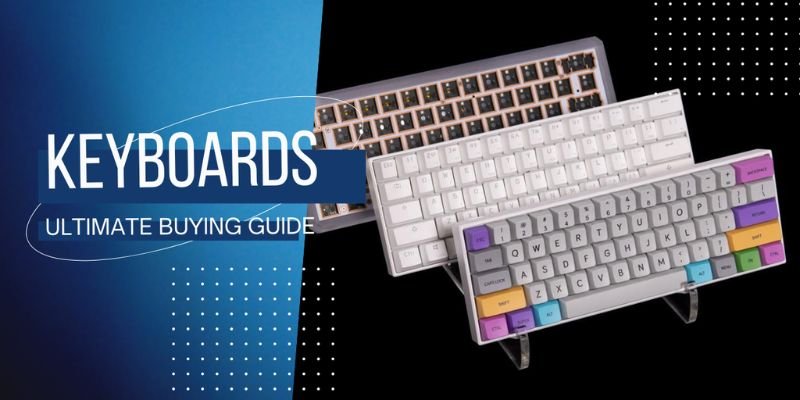
Many people struggle with issues like slow typing, wrist discomfort, or unresponsive keys because they choose the wrong type of keyboard. With so many options available, mechanical, wireless, ergonomic, and compact layouts, it can be confusing to know which one is best for your needs.
Many people struggle with issues like slow typing, wrist discomfort, or unresponsive keys because they choose the wrong type of keyboard. With so many options available, mechanical, wireless, ergonomic, and compact layouts, it can be confusing to know which one is best for your needs.
1 Purpose of Use: Why Do You Need a Keyboard in the First Place?
Before buying a keyboard, the first question to ask is simple: how will you use it every day? Your purpose directly affects the type of keyboard you should choose. A gamer needs fast response and low latency, while an office worker may prioritize comfort and quiet typing. Students, programmers, writers, and remote workers all have different needs regarding keyboard switches, key travel, and overall build quality.
Choosing a keyboard without considering its main purpose often leads to a poor typing experience, wrist discomfort, or reduced productivity. Let’s look at the most common real-world use cases and what features matter most.
1.1 Gaming vs Everyday Typing
Gamers typically need a keyboard that responds instantly to every key press. In competitive games like shooters or strategy titles, latency and key rollover can directly impact performance. Mechanical keyboards with fast keyboard switches are often preferred for their precise actuation and consistent key travel.
Everyday typing users, however, may not need these advanced features. Someone browsing the web, sending emails, or using social media mainly needs a comfortable typing experience and quiet operation.
Important features for gamers:
- Fast keyboard switches with short actuation
- Low-latency response
- N-key rollover or anti-ghosting
- Durable build quality
- Customizable RGB lighting
Important features for everyday users:
- Comfortable key travel
- Quiet typing experience
- Reliable wireless connectivity
- Simple and durable design
1.2 Office Work and Productivity
Millions of professionals in the United States now work from home or in hybrid office environments. For these users, a keyboard must support long hours of typing without causing strain.
Office workers often prioritize:
- Ergonomic design to reduce wrist fatigue
- Quiet keys suitable for shared workspaces
- Reliable wireless connectivity for a clean desk setup
- Durable build quality for daily use
Ergonomic keyboards are also becoming popular because they help maintain a natural wrist position. This reduces the risk of repetitive strain injuries that can develop from extended typing sessions.
1.3 Programming and Coding
Programmers and software developers spend thousands of hours typing code. For them, a keyboard must provide precision, durability, and consistency.
Many developers in the US prefer mechanical keyboards because they offer:
- Consistent key travel
- Distinct tactile feedback
- Long-lasting durability
- Better accuracy during fast typing
Compact keyboards such as Tenkeyless (TKL) or 75% layouts are also popular among developers. These layouts save desk space and keep the mouse closer to the keyboard, improving ergonomics.
1.4 Writing and Heavy Typing Tasks
Writers, bloggers, journalists, and students often type thousands of words per day. In this case, the keyboard must deliver a smooth and fatigue-free typing experience.
Key factors that matter for heavy typing include:
- Comfortable key travel
- Responsive but quiet
- Strong build quality for durability
- Ergonomic design to prevent wrist strain
Heavy typists often favor mechanical keyboards with tactile switches because they help maintain typing rhythm and accuracy. However, some users prefer quiet membrane keyboards for a softer typing feel.
2. Wired vs Wireless Keyboards: Which One Should You Choose?
One of the most common decisions in any keyboard buying guide is choosing between a wired keyboard and a wireless keyboard. Both options are widely used in the United States, from home offices and college dorm rooms to gaming setups. The right choice depends on how you use your computer, your workspace setup, and the features you value most.
Wired keyboards connect directly to a computer through a USB cable, while wireless keyboards use Bluetooth or a USB receiver to communicate with the device. Although both types can deliver a good typing experience, they differ in latency, convenience, battery requirements, and overall flexibility.
Understanding these differences will help you select a keyboard that fits your daily workflow.
2.1 Advantages of Wired Keyboards
Wired keyboards are known for their reliability and consistent performance. Because they connect directly to a computer, they usually provide faster response times and stable connectivity.
Key advantages of wired keyboards include:
- Lower latency compared to most wireless options
- Stable connection without signal interference
- No batteries required
- Consistent performance for gaming or fast typing
- Often lower price compared to wireless models
Another advantage is key rollover performance. Many wired mechanical keyboards support advanced features such as N-key rollover and anti-ghosting, which allow multiple keys to register simultaneously. This is important in fast-paced gaming and complex keyboard shortcuts. Wired keyboards also tend to have stronger build quality, especially in mechanical models that include durable keyboard switches and solid frames made of aluminum or reinforced plastic.
2.2 Benefits of Wireless and Bluetooth Keyboards
Wireless keyboards focus on convenience and flexibility. Instead of being attached by a cable, they connect using Bluetooth or a small USB receiver. This makes them very popular among office workers, students, and remote employees who want a clean and organized workspace.
Common benefits of wireless keyboards include:
- Cleaner desk setup with fewer cables
- Easy portability for students and travelers
- Ability to connect to multiple devices
- Ideal for minimalist workspaces
- Often designed with modern ergonomic design features
Bluetooth keyboards are especially useful for people who switch between devices such as laptops, tablets, and smartphones. Many models allow users to connect to multiple devices and switch instantly. Wireless keyboards can still provide a great typing experience, especially when they include high-quality keyboard switches and good key travel.
2.3 Latency, Battery Life, and Connectivity Considerations
While wireless keyboards have improved significantly, there are still a few technical factors to consider. Latency refers to the delay between pressing a key and the computer registering the input. Most users will not notice a small delay, but gamers and fast typists may prefer the immediate response of a wired keyboard.
Battery life is another factor. Wireless keyboards require power, usually from rechargeable batteries or replaceable AA or AAA batteries.
Things to consider when choosing wireless models:
- Battery life (some last weeks or months)
- Charging method (USB-C or replaceable batteries)
- Bluetooth vs USB receiver connectivity
- Potential signal interference in crowded wireless environments
Students who use laptops in libraries or classrooms often prefer wireless keyboards because they are portable and easy to pack. However, gamers typically prioritize stable connectivity and ultra-low latency, making wired keyboards the safer choice.
2.4 Best Choice for Gaming vs Office Use
The best keyboard type often depends on your main use case.
For example:
- A college student writing assignments might prefer a lightweight wireless keyboard with comfortable key travel.
- A professional working in a home office may value ergonomic design and wireless convenience.
- A competitive gamer will likely choose a wired mechanical keyboard with fast and strong key rollover support.
3. Keyboard Size and Layout Explained
Keyboard size and layout play a major role in your overall typing experience, desk comfort, and productivity. Different layouts change how many keys you have, how much desk space the keyboard takes, and how easily you can access important functions.
In the United States, users often choose keyboard sizes based on their work style. For example, office workers who regularly use spreadsheets prefer full-size keyboards with number pads, while gamers and programmers often prefer compact layouts to save desk space.
Choosing the right size also affects ergonomic design, key travel comfort, and mouse movement, which can influence long-term comfort and performance.
3.1 Full-Size (100%) Keyboards
A full-size keyboard, also called a 100% layout, includes every standard key found on a traditional desktop keyboard. This means it has the main typing area, function keys, arrow keys, navigation keys, and a dedicated numeric keypad.
Full-size keyboards are widely used in offices across the United States because they provide maximum functionality.
Common features of full-size keyboards:
- Complete key layout including numeric keypad
- Comfortable spacing between keys
- Strong build quality for long-term use
- Ideal for spreadsheet and data entry work
Full-size keyboards take up more desk space, which can reduce the mouse movement area and slightly affect ergonomic comfort during long sessions.
3.2 Tenkeyless (TKL) Keyboards
A Tenkeyless (TKL) keyboard removes the numeric keypad but keeps all other essential keys. This makes the keyboard smaller and easier to position on a desk. TKL keyboards are extremely popular among gamers and programmers in the United States.
Benefits of TKL keyboards include:
- More desk space for mouse movement
- Improved ergonomic design for gaming setups
- Lighter and easier to transport
- Retains function keys and arrow keys
- Often supports advanced features like key rollover and anti-ghosting
Gamers also prefer TKL layouts because the smaller size allows the mouse to sit closer to the keyboard, reducing shoulder strain during long gaming sessions.
3.3 Compact Layouts (75%, 65%, 60%)
Compact keyboards remove additional keys to create a smaller footprint while maintaining essential functionality. Popular layouts like the 60%, 65%, and 75% keyboard are designed for portability, cleaner desk setups, and improved gaming space. These compact mechanical keyboards are especially popular among gamers, programmers, and users who prefer minimalist setups.
Three common compact layouts include:
75% Keyboards
- Similar to TKL but with a tighter layout
- Includes arrow keys and function row
- Saves desk space while maintaining most functionality
65% Keyboards
- Removes the function row but keeps the arrow keys
- Compact design ideal for smaller desks
- Popular among programmers and writers
60% Keyboards
- Removes arrow keys, function row, and navigation cluster
- Uses key combinations for extra functions
- Extremely portable and minimal
For example, many students in the US who carry laptops between classes prefer 60% or 65% keyboards because they are lightweight and easy to pack in a backpack. Compact mechanical keyboards can still offer excellent key travel, even though they have fewer keys.
3.4 US Keyboard Layouts: ANSI vs ISO
Besides size, keyboard layouts also differ in how keys are arranged. The two most common layouts are ANSI and ISO. In the United States, the ANSI layout is the standard and is used in most keyboards sold across the country.
Key differences between ANSI and ISO layouts include:
- The Enter key shape
- Placement of the Shift key
- Number of keys on the keyboard
ANSI keyboards typically have a wider left Shift key and a rectangular Enter key. ISO layouts, more common in Europe, use a taller Enter key and slightly different spacing. Most American users prefer ANSI keyboards because they match standard US typing habits and software shortcuts.
4. Understanding Keyboard Switches (Mechanical vs Membrane)
It is one of the most important factors that affect the typing experience, speed, and comfort of a keyboard. A switch is the mechanism under each key that registers a key press when you type.
Most keyboards today use either mechanical switches or membrane technology. Each type has its own feel, durability, and performance characteristics. The right choice depends on how you use your keyboard whether for gaming, office work, programming, or everyday typing.
4.1 Mechanical Keyboard Switch Types
Mechanical keyboards use individual mechanical switches under every key. Each switch contains a spring and internal components that register keystrokes precisely. Because of their design, mechanical keyboards are known for:
- Consistent key travel
- Long lifespan (often 50+ million keystrokes)
- Better key rollover support
- Improved typing accuracy
Many gamers in the United States prefer mechanical keyboards because they deliver faster response times and reliable input during intense gameplay. Programmers and writers also favor mechanical keyboards because the switches provide clear feedback when a key is pressed. This can improve typing rhythm and reduce mistakes during long sessions. Mechanical keyboards are also available with many switch variations, allowing users to customize the typing experience.
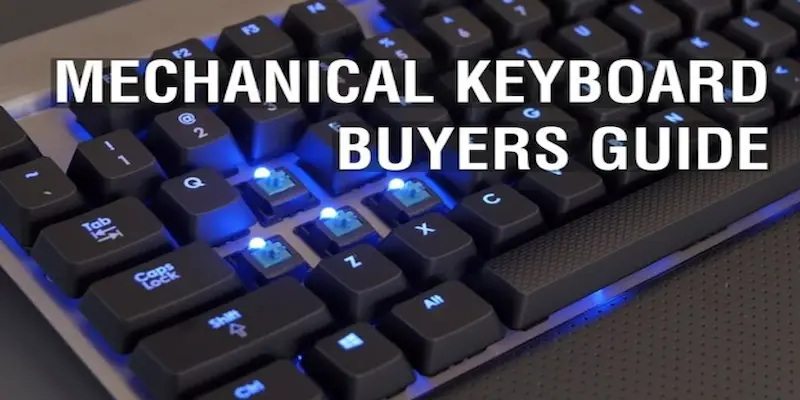
Key benefits of mechanical keyboards:
- Precise actuation points
- Excellent durability
- Smooth and consistent typing feel
- Ideal for heavy typing and gaming
- Often support advanced features like N-key rollover
4.2 Linear vs Tactile vs Clicky Switches
Mechanical keyboard switches generally fall into three main categories: linear, tactile, and clicky. Each type produces a different typing feel and sound.
Linear Switches
Linear switches move straight up and down without any noticeable bump or click.
Characteristics:
- Smooth key travel
- Quiet operation
- Fast actuation for gaming
- Minimal resistance
Gamers often choose linear switches because they allow quick repeated key presses with minimal effort. The smooth movement can reduce fatigue during long gaming sessions.
Tactile Switches
Tactile switches provide a small bump when the key activates.
Characteristics:
- Noticeable feedback when typing
- Balanced typing experience
- Moderate noise level
- Good for productivity tasks
Many office workers and programmers in the US prefer tactile switches because they confirm that a key has been pressed without producing excessive noise.
Clicky Switches
Clicky switches produce both a tactile bump and an audible click sound.
Characteristics:
- Strong typing feedback
- Distinct clicking sound
- Clear actuation point
- Popular among enthusiastic typists
Writers and students who enjoy a classic “typewriter-like” typing experience often prefer clicky switches, although they may be too loud for shared workspaces.
4.3 Membrane Keyboard Technology
Membrane keyboards use a completely different design. Instead of individual switches, they rely on pressure pads and rubber domes to register keystrokes. When you press a key, the rubber dome pushes down onto a circuit layer, sending the signal to the computer. Membrane keyboards are common in budget and office environments because they are inexpensive and quiet.
Advantages of membrane keyboards include:
- Lower cost
- Quiet typing experience
- Lightweight design
- Simple construction
Membrane keyboards usually provide:
- Shorter lifespan
- Less precise typing feedback
- Softer key travel
- Limited key rollover support
For example, a student using a basic desktop computer for homework might use a membrane keyboard because it is affordable and quiet. However, heavy typists may eventually prefer mechanical switches for better durability.
4.4 How Switch Choice Affects Typing and Gaming
The type of switch you choose directly affects speed, comfort, and performance.
Gamers typically prefer switches with fast response and low latency, while office workers may focus more on comfort and noise level.
Switch selection also affects ergonomic design and fatigue. Switches that require too much force can cause finger strain during long typing sessions.
Important factors influenced by switch choice:
- Typing speed and accuracy
- Key travel distance
- Noise level
- Durability and build quality
- Gaming responsiveness and latency
For example:
- A competitive gamer may prefer linear switches for rapid key presses.
- A programmer might choose tactile switches for feedback and precision.
- A writer may enjoy clicky switches for the satisfying typing feel.
5. Build Quality, Materials, and Ergonomic Design
A well-built keyboard lasts longer, feels more stable, and provides a better overall typing experience. Poorly built keyboards may feel flimsy, produce inconsistent key travel, and wear out quickly.
In the United States, people often use keyboards for many hours every day whether for remote work, gaming, or school assignments. Because of this, factors like ergonomic design, frame materials, and keycap quality play an important role in comfort and durability.
5.1 Keyboard Frame Materials (Plastic vs Aluminum)
The outer frame or case of a keyboard is usually made from plastic or aluminum. Each material affects the keyboard’s durability, weight, and typing feel.
Plastic Keyboard Frames
Plastic keyboards are the most common and affordable option. Many office and entry-level keyboards use plastic frames because they are lightweight and inexpensive.
Advantages of plastic frames:
- Lower price point
- Lightweight and portable
- Widely available
- Good for casual or office use
For example, a college student using a basic desktop computer for online classes may choose a plastic keyboard because it is affordable and easy to carry. Cheaper plastic keyboards may feel less stable. They can flex slightly during heavy typing, which may affect the typing experience over time.
Aluminum Keyboard Frames
Premium keyboards often use aluminum or metal frames. These provide stronger structural stability.
Benefits of aluminum frames include:
- More durable construction
- Reduced keyboard flex
- Premium feel and appearance
- Better stability during fast typing or gaming
For example, many gamers and programmers in the US prefer aluminum mechanical keyboards because the solid frame keeps the keyboard stable during rapid key presses.
The extra weight also helps keep the keyboard in place, which is useful when using features like key rollover during gaming sessions.
Keycap Materials (ABS vs PBT)
Keycaps are the plastic covers on top of each key. The material used for keycaps affects durability, texture, and long-term typing comfort.
The two most common keycap materials are ABS and PBT.
ABS Keycaps
ABS (Acrylonitrile Butadiene Styrene) is widely used in many keyboards.
Characteristics of ABS keycaps:
- Smooth surface texture
- Lightweight design
- Lower production cost
- Common in budget and mid-range keyboards
However, ABS keycaps can develop a shiny surface after heavy use. For example, office workers who type thousands of words daily may notice wear on frequently used keys.
PBT Keycaps
PBT (Polybutylene Terephthalate) is a stronger and more durable plastic.
Benefits of PBT keycaps:
- More resistant to wear and shine
- Slightly textured surface for better grip
- Longer lifespan
- Higher durability during heavy typing
Many mechanical keyboard enthusiasts in the US prefer PBT keycaps because they maintain their texture and appearance even after years of use.
5.2 Ergonomic Keyboards and Wrist Comfort
Typing for long hours can lead to wrist fatigue or discomfort if the keyboard design is not supportive. This is where ergonomic design becomes important. Ergonomic keyboards are designed to reduce strain on the hands and wrists by improving typing posture.
Common ergonomic features include:
- Split keyboard layouts
- Curved key arrangements
- Adjustable typing angles
- Wrist rests for additional support
For example, a remote office worker spending eight hours a day typing emails and reports may benefit from an ergonomic keyboard that supports natural wrist positioning. Proper ergonomic design can reduce strain while maintaining comfortable key travel and smooth typing performance. Gamers also benefit from ergonomic keyboards because they reduce fatigue during long gaming sessions.
5.3 Durability and Long-Term Reliability
A keyboard should be able to handle years of regular use without losing performance. High-quality keyboards use better materials and stronger internal components.
Factors that affect keyboard durability include:
- Strong frame construction
- Durable keycap materials
- Stable internal mounting design
A software developer typing thousands of lines of code each week needs a keyboard with reliable switches and consistent key travel. A well-built mechanical keyboard can last for many years while maintaining excellent responsiveness and low latency. High durability also ensures that features like key rollover and fast actuation continue to perform correctly over time.
6. Additional Keyboard Features and Functions
Modern keyboards offer more than just basic typing. Many models include advanced features designed to improve productivity, customization, and performance. These features can enhance the typing experience, support faster workflows, and make keyboards more versatile for gaming, office work, or creative tasks.
For users in the United States especially gamers, remote workers, and students features like RGB lighting, programmable keys, hot-swappable switches, and key rollover technology can make a noticeable difference in everyday use.
Understanding these functions helps you choose a keyboard that matches your needs rather than paying for features you may never use.
6.1 RGB Lighting and Backlit Keys
Backlit keyboards include lights under the keys to make them visible in low-light environments. This feature is useful for people who work or game at night.
There are two common types of lighting:
Single-Color Backlighting
- One color of light across the keyboard
- Simple brightness control
- Common in office or productivity keyboards
RGB Lighting
- Multiple customizable colors
- Dynamic lighting effects
- Often used in gaming keyboards
A gamer in the US playing late at night may prefer RGB lighting because it improves key visibility and adds visual style to a gaming setup. Some gaming keyboards also allow lighting to sync with other devices, like gaming mice or PC cases. Office workers may prefer simpler white backlighting that improves visibility without being distracting.
Benefits of backlit keyboards:
- Easier typing in dim lighting
- Improved keyboard visibility
- Customizable visual appearance
- Helpful for late-night work or gaming
6.2 Programmable Keys and Macro Support
Programmable keys allow users to assign custom commands or shortcuts to specific keys. This feature is extremely useful for productivity and gaming. A macro is a sequence of actions that can be triggered with a single key press.
For example:
- A video editor may assign editing shortcuts to programmable keys.
- A gamer might create macros for complex in-game actions.
- An office worker could automate repetitive commands.
Advantages of programmable keys:
- Faster workflow
- Reduced repetitive typing
- Customizable keyboard control
- Useful for both productivity and gaming
Many mechanical keyboards include software that allows users to create macros, adjust keyboard switch behavior, or customize lighting settings.
6.3 Hot-Swappable Switches
Hot-swappable keyboards allow users to change keyboard switches without soldering. This feature is becoming increasingly popular among keyboard enthusiasts and gamers. Normally, switches are permanently attached to the keyboard circuit board. Hot-swappable designs allow users to remove and replace switches easily.
Benefits of hot-swappable keyboards include:
- Easy customization of typing feel
- Longer keyboard lifespan
- Convenient upgrades without buying a new keyboard.
Hot-swappable keyboards give users the flexibility to customize their typing experience over time.
6.4 Anti-Ghosting and N-Key Rollover
When typing or gaming quickly, users often press multiple keys at the same time. A good keyboard must be able to register all of those inputs accurately. This is where anti-ghosting and N-key rollover become important.
Anti-Ghosting
Anti-ghosting prevents the keyboard from missing key presses when multiple keys are pressed together.
N-Key Rollover
N-key rollover allows every pressed key to register independently, even if many keys are pressed simultaneously. This feature is especially important for gamers who rely on fast input combinations.
Benefits of these technologies include:
- Accurate input detection
- Better gaming responsiveness
- Improved typing accuracy
- Reduced input errors during fast typing
High-quality keyboards with strong build quality and advanced keyboard switches usually offer better key rollover performance and lower latency.
7. Budget Considerations and Popular Keyboard Brands
Keyboard prices vary widely depending on features, build quality and brand reputation. In the United States, keyboards typically fall into three main price categories: entry-level, mid-range, and premium mechanical keyboards.
Understanding these price ranges helps buyers choose a keyboard that fits their needs without overspending. A student writing essays may not need a high-end gaming keyboard, while a competitive gamer may prefer a premium keyboard with faster latency and advanced features. Your budget should balance performance, typing comfort, durability, and useful features such as key rollover, ergonomic design, and reliable connectivity.
7.1 Entry-Level Budget Keyboards
Entry-level keyboards usually cost between $20 and $60. These custom keyboards are ideal for students, casual users, and people who only type occasionally. Most budget keyboards use membrane technology, but some affordable mechanical keyboards are also available.
Common features of entry-level keyboards:
- Basic membrane or entry-level mechanical switches
- Standard typing experience with moderate key travel
- Limited RGB lighting or customization
- Basic key rollover support
Some popular Keychron K2 keyboards include models from brands like Keychron, Redragon, and Royal Kludge. Compact mechanical keyboards like the Royal Kludge RK61 are often available for around $45–$60, offering wireless connectivity and customizable switches for budget users.
Budget keyboards are great for everyday typing, but they may not provide the same durability or performance as higher-end models.
7.2 Mid-Range Keyboards for Everyday Users
Mid-range keyboards typically cost between $60 and $150. This price range offers the best balance between performance and affordability.
Many mid-range keyboards include:
- RGB lighting options
- Better ergonomic design
- Reliable wireless or wired connectivity
- Stronger key rollover performance
Some keyboards in this category, such as the Keychron keyboards K2 or similar models, offer wireless connectivity, customizable switches, and ergonomic typing angles at affordable prices. This category is often considered the sweet spot for most users because it combines strong performance with reasonable cost.
7.3 Premium Mechanical Keyboards
Premium keyboards usually cost $150 to $300 or more. These keyboards are designed for enthusiasts, professional gamers, and heavy typists who want the best typing performance.
Premium keyboards often include:
- Aluminum frames
- Advanced RGB lighting systems
- Customizable macros and software
- Superior key rollover and lower latency
- Premium keycap materials like PBT
High-end keyboards also often include hot-swappable switches, allowing users to experiment with different switch types for a personalized typing experience. Some premium keyboards can even exceed $200 when they include advanced materials, custom switches, or enthusiast-grade designs.
7.4 Trusted Keyboard Brands in the USA
Several keyboard brands are widely trusted in the United States because of their product quality, durability, and innovation.
Popular keyboard brands include:
Gaming and Performance Brands
- Logitech
- Corsair
- Razer
- SteelSeries
- HyperX
These brands focus heavily on gaming performance, low latency, and customizable RGB lighting.
Mechanical Keyboard Enthusiast Brands
- Keychro
- Akko
- Epomaker
- Royal Kludge
These companies focus on customizable mechanical keyboards with high-quality switches and strong typing performance.
Ergonomic Keyboard Brands
- Kinesis
- Maltron
These companies specialize in ergonomic keyboards designed to reduce strain and improve typing comfort during long sessions
7.5 Keyboard Price Comparison
| Price Range | Typical Cost | Best For | Key Features |
|---|---|---|---|
| Entry-Level | $20 – $60 | Students, casual users | Basic typing, simple design |
| Mid-Range | $60 – $150 | Office workers, gamers | Mechanical switches, better build quality |
| Premium | $150 – $300+ | Enthusiasts, professional gamers | High-end switches, aluminum frame, advanced features |
8. Final Thoughts: How to Choose the Right Keyboard
Choosing the right keyboard is more than picking a brand or color. Your selection affects your typing experience, comfort, and productivity every day. Whether you are a gamer, office worker, student, or programmer, the right keyboard improves speed, reduces fatigue, and enhances accuracy.
By now, you’ve learned about keyboard types, layouts, switches and advanced features. The next step is understanding how to apply this knowledge in real-world scenarios to make the best choice for your setup.
8.1 Quick Checklist Before Buying
Before you make a purchase, consider the following points to ensure your keyboard matches your needs:
- Purpose of use: Gaming, typing, programming, or office work
- Keyboard type: Mechanical or membrane switches for desired key travel and typing feel
- Layout and size: Full-size, TKL, 75%, 65%, or 60%, depending on desk space and ergonomic needs
- Connectivity: Wired for low latency or wireless for portability
- Advanced features: RGB lighting, programmable keys, hot-swappable switches, key rollover
- Ergonomic design: Split layout or wrist rest for long typing sessions
- Budget: Entry-level, mid-range, or premium mechanical keyboard
- Long-term value: Upgradeable switches and durability
8.2 Matching a Keyboard to Your Needs
Choosing the right keyboard depends heavily on how you use it daily. Here are some real-life examples:
- Gamers: Prefer mechanical switches with fast response, low latency, and N-key rollover for accurate multi-key input. RGB lighting and programmable keys enhance gameplay and aesthetics. A TKL or compact layout improves mouse movement space
- Office workers: Benefit from ergonomic design, quiet tactile switches, and full-size layouts with numeric pads for spreadsheets and reports.
- Students: May prefer wireless or compact keyboards for portability. Moderate key travel and smooth typing experience are sufficient for writing essays or coding assignments.
- Programmers often select tactile or clicky mechanical switches with consistent key travel. Hot-swappable switches allow experimentation with different switch types to optimize typing comfort.
By analyzing your daily tasks, you can prioritize features that matter most, avoiding unnecessary features that increase cost without real benefit.
8.3 Long-Term Value and Upgrade Options
Investing in a high-quality keyboard pays off over time. Features like hot-swappable keys and durable build materials allow you to maintain and upgrade your keyboard rather than replacing it entirely.
Consider these long-term benefits:
- Hot-swappable switches: Easily upgrade switches to improve typing feel or adapt to new tasks.
- Replaceable keycaps: High-quality PBT keycaps last longer and maintain texture.
- Ergonomic design adjustments: Adjustable tilt or wrist rest improves comfort over years of use.
- Software customization: Programmable keys and macro support can be updated as your workflow evolves.
For instance, a professional gamer or programmer in the US might invest in a premium mechanical keyboard with hot-swappable switches. Even if their needs change over time, they can swap switches, upgrade keycaps, or reprogram keys without buying a new keyboard. This extends the lifespan and build quality, providing better value for the investment.
Conclusion
Choosing the right keyboard is more than picking a brand or style it directly affects your typing experience, productivity, and comfort. Whether you’re a gamer seeking low latency and fast keyboard switches, an office worker needing ergonomic design and quiet keys, a programmer requiring tactile feedback, or a student looking for portability, the right keyboard makes daily tasks easier and more efficient.
FAQs
The best keyboard for typing comfort has tactile mechanical switches, ergonomic design, and proper key travel. Full-size or TKL layouts with wrist support reduce strain during long typing sessions.
Choose wired keyboards for low latency and gaming, and wireless keyboards for portability and a clean desk setup. Your choice depends on whether speed or flexibility matters more.
Full-size keyboards are ideal for office work and spreadsheets, while TKL or 60–75% layouts save desk space for gamers, programmers, and students who need a compact setup.
Yes, mechanical keyboards offer longer lifespan, consistent key travel, and better key rollover. Membrane keyboards are quieter and cheaper but less durable for heavy typing or gaming.
RGB lighting is optional it improves visibility in low-light and adds style. Gamers and streamers often use it, while office users may prefer simpler backlit keys for focus.
Key rollover ensures every key press registers correctly, even when multiple keys are pressed at once. It’s essential for fast typists and gamers using complex commands.
For gaming, linear mechanical switches are preferred for smooth, fast actuation. Low latency, durable build, and responsive key travel improve reaction times in competitive games.
Durable keyboards feature high-quality materials like aluminum frames, PBT keycaps, and reliable mechanical switches. Strong build quality ensures long-term comfort, consistent typing, and reduced key wear.
