How to Choose the Best Keyboard Switches for Gaming
Published: 25 Apr 2026
Your keyboard switch is one of the most important performance variables in your entire setup. More impactful than your mousepad. More noticeable than your monitor refresh rate upgrade from 144Hz to 165Hz.
And yet most gamers spend hours researching GPUs and completely ignore the one component their fingers touch thousands of times every single gaming session. If you are serious about finding the best keyboard switches for gaming whether you play FPS, MOBA, battle royale, or just want a better feel under your fingers.
This guide covers everything. I have tested and researched these switches extensively, and by the end of this article, you will know exactly which switch is right for your playstyle, your budget, and your hands.
What Are Keyboard Switches and Why Do They Matter in Gaming?
Keyboard switches for gaming are the individual mechanical components that sit underneath every key on a mechanical keyboard. When you press a key, the switch is what physically registers that input and sends it to your PC.
Every switch has three defining characteristics that directly affect your gaming performance:
- Actuation point: the exact distance the key must travel before the input registers
- Actuation force: the amount of finger pressure required to trigger the key
- Feedback type: whether the switch gives you a physical bump, an audible click, or nothing at all
A switch with a 1.2mm actuation point registers your keypress at almost half the travel distance of a standard 2mm switch. In a game like CS2 where counter-strafing requires precise, rapid key inputs, that difference is physically measurable. Professional players have reported feeling the difference within minutes of switching.
Actuation force matters just as much for long gaming sessions. A switch requiring 45g of force feels completely different after four hours of gaming compared to one requiring 35g. Lighter switches reduce finger fatigue, which means your aim and reaction time stay sharper deep into a session.
The bottom line is this: your keyboard switch is your physical connection to the game. Every ability, every strafe, every crouch, every shot it all starts with a switch activation. Choosing the right one is not optional if you care about performance.
The 3 Types of Keyboard Switches Every Gamer Should Understand
Before I get into specific recommendations, you need to understand the three core switch types. This is the foundation everything else builds on.
Linear Switches
Linear switches move in a perfectly straight, smooth line from the top of the keystroke to the bottom. There is no bump. There is no click. Just consistent, frictionless travel from press to bottom out.
- Feel: Smooth, quiet, consistent
- Best for Gaming: especially FPS, battle royale, and competitive titles
- Popular examples: Cherry MX Red, Gateron Yellow, Razer Yellow Optical
This is the switch type I personally use and recommend to almost every gamer I talk to. The absence of any bump or resistance means your fingers can move faster with less effort. When you are counter-strafing in Valorant or spamming abilities in a MOBA, any interruption in that keystroke motion slows you down and linear switches eliminate that interruption.
The gaming community has largely settled on linear switches as the gold standard for competitive play, and after years of testing different types, I completely agree with that consensus.
Tactile Switches
Tactile switches have a noticeable physical bump at the actuation point. When you feel that bump, you know the keypress has registered without needing to bottom out the key or hear any sound.
- Feel: Bumpy, relatively quiet
- Best for: Gamers who spend equal time typing and gaming
- Popular examples: Cherry MX Brown, Gateron Brown, Holy Pandas
Tactile switches are genuinely good but they are a compromise. The bump that helps typists avoid errors is the same bump that creates micro-resistance during rapid gaming keypresses. For casual gaming, they work perfectly well. For competitive play, that resistance adds up.
I would recommend tactile switches specifically to gamers who use their keyboard for work or writing during the day and gaming in the evening. The tactile feedback genuinely improves typing accuracy and reduces fatigue during long writing sessions.
Clicky Switches
Clicky switches combine a tactile bump with an audible click sound at the actuation point. They are the loudest, most satisfying switch type to type on and the worst choice for serious gaming.
- Feel: Bumpy and loud
- Best for: Typists, casual gamers, people who love the sound
- Popular examples: Cherry MX Blue, Razer Green, Kailh Box White
I want to be fair to clicky switches here. They are genuinely excellent for typing. The combination of tactile and audio feedback creates a deeply satisfying experience that many people find addictive. The problem for gaming is practical: the heavier actuation force, longer travel requirement, and loud click make them slower and more fatiguing for rapid gaming inputs.
If you share a space with others a dorm room, an office, a family home clicky switches will also make you genuinely unpopular during gaming sessions.
For competitive gaming, clicky switches are the wrong tool. For typing enthusiasts who play games casually, they are wonderful.
Best Keyboard Switches for Gaming in 2026 Detailed Reviews
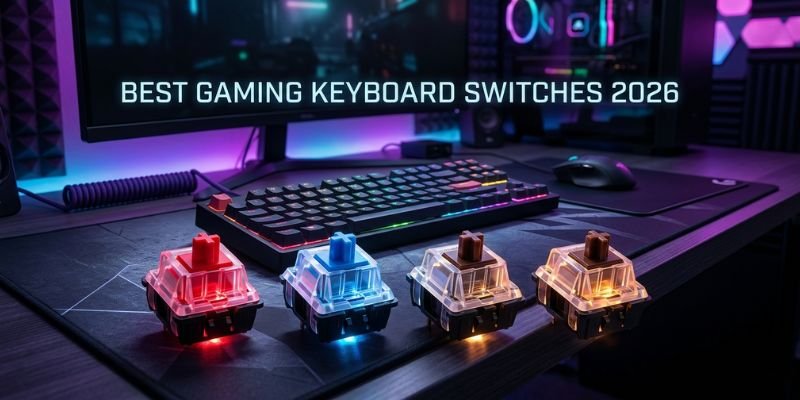
Here are the best color switches for gaming that actually matter for gaming performance right now. I have organized these by use case so you can find your match quickly.
1. Cherry MX Red The Reliable All-Rounder
Cherry MX Red has been the default recommendation for gaming keyboards for over a decade and that reputation is completely deserved.
- Type: Linear
- Actuation point: 2mm
- Total travel: 4mm
- Actuation force: 45g
- Sound level: Near silent
- Lifespan: 50 million keystrokes
What makes Cherry MX Red so consistently recommended is not that it is the absolute fastest or the absolute lightest it is that it does everything well without any significant weaknesses. The 45g actuation force is light enough to reduce fatigue but heavy enough to prevent accidental keypresses. The 2mm actuation is fast enough for competitive play without being hair-trigger sensitive.
In real gaming terms, Cherry MX Red handles FPS games well, performs great in MOBAs, handles battle royale mechanics cleanly, and never feels like it is fighting against you.
The one honest criticism is that out of the box, Cherry MX Reds feel slightly scratchy compared to some competitors. Lubing them makes a significant difference more on that later.
Best for: All gaming genres, beginners to mechanical keyboards, gamers who want proven reliability
2. Cherry MX Speed Silver Built for Competitive Speed
Speed Silver is what Cherry MX created specifically for competitive gamers who felt the standard Red was not fast enough.
- Type: Linear
- Actuation point: 1.2mm
- Total travel: 3.4mm
- Actuation force: 45g
- Sound level: Silent
- Lifespan: 50 million keystrokes
The 1.2mm actuation point is the defining feature here. Your keypress registers at almost half the travel distance of a standard switch. In practice, this means your inputs hit the game before your brain has even consciously completed the press motion.
I tested Speed Silver extensively in CS2, and the difference in counter-strafing precision was immediately noticeable. Movement inputs registered cleaner and faster, which translated directly into tighter stop-and-shoot mechanics.
The one thing to be aware of: the extremely short actuation point means accidental keypresses are more common when you first switch to it. Most gamers adapt within a few days, but if you tend to rest your fingers heavily on keys, Speed Silver will require a slight adjustment period.
Best for: Competitive FPS players, esports, CS2, Valorant, reaction-time-dependent games
3. Gateron Yellow The Smoothest Budget Switch Available
Gateron Yellow is genuinely one of the most impressive value propositions in the entire mechanical keyboard market. It should not feel this good at this price point but it does.
- Type: Linear
- Actuation point: 2mm
- Total travel: 4mm
- Actuation force: 35g
- Sound level: Very quiet
- Lifespan: 50 million keystrokes
The 35g actuation force makes Gateron Yellow the lightest mainstream gaming switch available. Combined with a factory smoothness that many experienced keyboard enthusiasts argue beats Cherry MX Red out of the box, it delivers a genuinely premium feel at a budget price.
For long gaming sessions four, five, six hours of continuous play the lighter actuation force makes a real difference in finger fatigue. Your hands feel noticeably fresher at the end of a long session compared to heavier switches.
The honest trade-off is that 35g is very light, which means finger resting on keys can trigger accidental inputs. Gamers who lift their fingers cleanly off keys between presses will love Gateron Yellow. Gamers who tend to rest fingers on keys may find it too sensitive initially.
Best for: Budget gaming builds, long gaming sessions, gamers who prefer ultra-light switches
4. Razer Yellow Optical Zero Lag Optical Performance
Razer’s optical switch technology represents a genuinely different approach to switch engineering and for gaming, the results are impressive.
Traditional mechanical switches use physical metal contacts to register keypresses. These contacts require a tiny debounce delay usually 5 to 10 milliseconds to confirm the keypress is intentional and not electrical noise. Optical switches eliminate metal contacts, using an infrared light beam instead. When your keypress interrupts the light beam, the input registers instantly with zero debounce delay.
- Type: Optical Linear
- Actuation point: 1.2mm
- Total travel: 4mm
- Actuation force: 45g
- Sound level: Silent
- Lifespan: 100 million keystrokes
In competitive gaming, that debounce delay elimination is genuinely meaningful. Combined with the 1.2mm actuation point, Razer Yellow Optical is among the fastest registering switches you can buy.
The durability figure is also worth noting. At 100 million keystrokes, optical switches last twice as long as most traditional mechanical switches. For a dedicated gamer who plays daily, that translates to years of additional lifespan.
The limitation is ecosystem lock-in. Razer optical switches use a proprietary design and are only available in Razer keyboards. If you want optical performance without the Razer commitment, alternatives like Gateron Optical are worth exploring.
Best for: Esports players, streamers, zero-lag priority, long-term durability
5. Wooting Lekker The Most Advanced Gaming Switch in 2026
The Wooting Lekker is the switch that made the entire gaming keyboard community stop and pay attention. It uses Hall Effect magnetic technology the same principle used in analog joysticks to detect exactly how far down each key is pressed.
- Type: Hall Effect Linear
- Actuation point: Fully adjustable from 0.1mm to 4.0mm
- Total travel: 4mm
- Actuation force: Adjustable
- Sound level: Silent
- Lifespan: Effectively unlimited no physical contact points
The adjustable actuation point is what makes this switch revolutionary. You can set it to 0.1mm for the fastest possible registration faster than any traditional switch. Or you can set it to 3.5mm if you want to avoid any accidental inputs during intense gameplay. You can change it whenever you want through the software.
The analog input capability adds another layer entirely. Because the switch detects depth of press rather than just on or off, games that support analog input racing titles, certain FPS games with partial movement respond differently based on how far you press. It is a genuinely new way to interact with PC games.
The honest limitation is price and availability. Wooting keyboards are premium products and less widely available than Cherry MX or Gateron options. But for serious gamers who want the cutting edge of switch technology in 2026, nothing else comes close.
Best for: Advanced gamers, customization enthusiasts, racing games, analog input gaming
Best Switches for FPS Gaming Specifically
FPS gaming deserves its own section because the requirements are more specific than general gaming. In CS2, Valorant, Apex Legends, and similar titles, these are the inputs that happen hundreds of times per match:
- Counter-strafing: rapid alternating left and right movement keys
- Crouch spamming: rapid repeated crouch key activation
- Ability activation: precise single presses under pressure
- Weapon switching: fast single-key activations
Every one of these inputs benefits from the same switch characteristics: short actuation point, light actuation force, smooth linear travel.
Here are the top FPS-specific recommendations:
| Switch | Actuation Point | Actuation Force | FPS Strength |
| Cherry MX Speed Silver | 1.2mm | 45g | Fastest traditional actuation |
| Razer Yellow Optical | 1.2mm | 45g | Zero debounce delay |
| Wooting Lekker | 0.1mm adjustable | Adjustable | Maximum customization |
| Gateron Yellow | 2mm | 35g | Lightest force, budget price |
My personal recommendation for FPS gaming is Cherry MX Speed Silver for gamers on a budget and Razer Yellow Optical for gamers willing to invest in an optical setup. The Wooting Lekker is the premium choice if you want full control over every variable.
Fastest Keyboard Switches for Gaming Full Speed Ranking
Speed in keyboard switches is determined by two measurements working together. The actuation point determines how early in the keystroke travel the input registers. Actuation force determines how quickly your finger can apply enough pressure to trigger that actuation.
Here is the complete speed ranking for 2026:
| Rank | Switch | Actuation Point | Actuation Force | Speed Rating |
| 1st | Wooting Lekker | 0.1mm minimum | Adjustable | Fastest available |
| 2nd | Cherry MX Speed Silver | 1.2mm | 45g | Fastest traditional |
| 2nd | Razer Yellow Optical | 1.2mm | 45g | Fastest optical |
| 3rd | Kailh Speed Gold | 1.4mm | 50g | Fast clicky option |
| 4th | Gateron Yellow | 2mm | 35g | Fast and light |
| 5th | Cherry MX Red | 2mm | 45g | Reliable standard |
One important clarification: fastest on paper does not always mean fastest in practice for every gamer. The Wooting Lekker at 0.1mm is theoretically fastest but many gamers find ultra-short actuation requires an adaptation period. Speed Silver at 1.2mm hits the sweet spot of genuinely fast actuation without requiring significant technique adjustment.
Red Switches vs Blue Switches for Gaming
This comparison comes up constantly in gaming communities, and the answer is less complicated than people make it.
Cherry MX Red at a Glance
- Type: Linear
- Actuation point: 2mm
- Actuation force: 45g
- Sound: Near silent
- Gaming performance: Excellent
Cherry MX Blue at a Glance
- Type: Clicky
- Actuation point: 2.2mm
- Actuation force: 60g
- Sound: Very loud
- Gaming performance: Below average for competitive play
Why Red Wins for Gaming Every Time
The actuation force difference alone tells most of the story. Blue switches require 60g of force 33 percent more pressure than Red switches. Over hundreds of keypresses per gaming session, that additional force requirement adds up to measurably more finger fatigue.
The tactile bump in Blue switches creates an additional problem for rapid repeated keypresses. When you are counter-strafing or spamming an ability key, that bump creates micro-resistance that interrupts the smooth, rapid motion linear switches allow.
The sound issue is practical rather than performance-related but it matters. If you game with a headset microphone or stream, Blue switch noise bleeds into audio constantly. Teammates notice it. Viewers notice it.
Here is the honest summary: Blue switches are genuinely excellent for their intended purpose, which is typing. They were never designed to be gaming switches. Cherry MX Blue is a typing switch that people also use for gaming not a gaming switch.
For the red switches vs blue switches for gaming debate, Red is the correct answer for anyone serious about performance.
Smooth Linear Switches for Gaming Why the Gaming Community Chose Linear
The gaming community’s embrace of smooth linear switches for gaming was not a marketing trend. It came from millions of gamers independently discovering the same thing: linear switches simply work better for gaming mechanics than any other type.
Here is the practical reasoning. Gaming keypresses fall into two categories: precision single presses and rapid repeated presses. Linear switches handle both categories optimally.
For precision single presses activating an ultimate ability at the right moment, for example linear switches give you a clean, predictable actuation every time. No bump to second-guess, no click to wait for. Just press and register.
For rapid repeated presses movement key spamming, crouch spam, rapid weapon switching the absence of any bump or resistance means your finger meets zero interruption. The switch gets out of the way and lets you move as fast as your fingers can physically move.
The smoothest linear switches available right now:
- Gateron Yellow: lightest and smoothest at a budget price, 35g
- Gateron Ink Black: premium smooth feel with satisfying heavier weight, 60g
- Cherry MX Red: reliable and consistent, widely available, 45g
- Razer Yellow Optical: optically smooth with zero lag, 45g
- Everglide Aqua King: community favorite for buttery smooth feel, 45g
- Gateron Oil King: newer release praised for exceptional smoothness, 37g
If smoothness is your priority above all else, Gateron Yellow and Gateron Ink Black are the community consensus top picks. Both benefit significantly from lubing, which I will cover in the next section.
Switch Modding for Gamers Making Good Switches Feel Amazing
This section addresses one of the biggest content gaps in most gaming switch guides. The mechanical keyboard community has developed a set of simple modifications that dramatically improve how switches feel — and serious gamers should know about them.
Lubing Switches
Lubing involves applying a thin layer of lubricant to the internal components of a switch primarily the stem, rails, and sometimes the spring. The result is a noticeably smoother, quieter keystroke.
For gaming, lubing makes the biggest difference on linear switches. A lubed Gateron Yellow or Cherry MX Red feels significantly smoother than an unlubed version. The scratchy feeling that stock Cherry MX Reds are sometimes criticized for disappears almost entirely with a proper lube job.
The most commonly recommended lubricants for gaming switches are Krytox 205g0 for linear switches and Tribosys 3203 for tactile switches.
Switch Films
Switch films are thin pieces of material placed between the top and bottom housing of a switch. They reduce wobble in the switch housing, resulting in a tighter, more consistent keystroke feel. Combined with lubing, films take a good switch to excellent.
Spring Swapping
Every switch contains a spring that determines the actuation force. Springs can be swapped independently, allowing you to combine your preferred stem and housing with a lighter or heavier spring weight. This level of customization means you can effectively create a switch tuned precisely to your preference.
Gaming Switches for Streamers and Content Creators
This audience is large and underserved in most switch guides. If you stream your gameplay or create gaming content, your switch choice affects your production quality directly.
The core requirement for streamers is silence. Mechanical switch noise bleeds into the microphone audio constantly especially clicky and tactile switches. For streaming setups, the priority list looks like this:
- Priority: Silent linear switches
- Best options: Gateron Yellow, Cherry MX Silent Red, Razer Yellow Optical
- Cherry MX Silent Red adds rubber dampeners to an already quiet linear switch, making it one of the quietest options available
- Optical switches are also excellent for streaming due to their near-silent operation
If you use a high-quality microphone with a narrow pickup pattern or a good noise gate, standard linear switches like Cherry MX Red is the best keyboard switches for gaming and typing. The noise becomes a concern primarily with entry-level microphone setups.
Switch Guide by Gaming Genre
Different gaming genres have genuinely different optimal switch characteristics. Here is a practical breakdown:
FPS Games CS2, Valorant, Apex Legends, Call of Duty
Priority: Speed and actuation point. Recommended switches: Cherry MX Speed Silver, Razer Yellow Optical, Wooting Lekker. Why: Rapid counter-strafing and reaction-time inputs benefit from the shortest possible actuation
MOBA Games League of Legends, Dota 2, Heroes of the Storm
Priority: Light actuation force and rapid repeated presses. Recommended switches: Gateron Yellow, Cherry MX Red. Why: Ability spamming and rapid item activations require light, fast switches that do not cause fatigue over long sessions
Battle Royale Fortnite, PUBG, Warzone
Priority: Balance of speed and accuracy. Recommended switches: Cherry MX Red, Cherry MX Speed Silver. Why: Building mechanics in Fortnite specifically benefit from fast linear switches, while the pace and variety of battle royale suits an all-round performer
MMO Games World of Warcraft, Final Fantasy XIV
Priority: Heavier actuation to prevent accidental ability triggers. Recommended switches: Cherry MX Brown, Gateron Brown, Cherry MX Red. Why: MMO players maintain fingers on many keys simultaneously, making accidental activations a real concern slightly heavier or tactile switches help
Racing Games Assetto Corsa, iRacing, Forza
Priority: Analog input capability Recommended switches: Wooting Lekker Why: Hall Effect analog input allows partial keypress acceleration and steering inputs, which transforms the racing game feel entirely
Casual and Indie Gaming
Priority: Personal comfort preference. Recommended switches: Any type based on personal preference. Why: Competitive performance differences are negligible for casual play choose based on what feels satisfying
Switch Lifespan and Durability Guide
This is another topic most gaming switch articles skip entirely and it matters for long-term value assessment.
| Switch Type | Rated Lifespan | Real World Gaming Lifespan |
| Cherry MX Red | 50 million keystrokes | 5 to 10 years of heavy gaming |
| Gateron Yellow | 50 million keystrokes | 5 to 10 years of heavy gaming |
| Razer Yellow Optical | 100 million keystrokes | 10 to 20 years of heavy gaming |
| Wooting Lekker | Effectively unlimited | No physical contact wear |
| Cherry MX Blue | 50 million keystrokes | 5 to 10 years mixed-use |
A gamer playing 4 hours daily and pressing each key an average of 10 times per session would take approximately 13 years to reach 50 million actuations on a single key. Switch lifespan is rarely a practical concern for individual keys the exception being specific high-use gaming keys like WASD and Space.
Full Comparison Table Linear vs Tactile vs Clicky for Gaming
| Feature | Linear | Tactile | Clicky |
| Gaming Speed | Excellent | Average | Below Average |
| FPS Performance | Excellent | Average | Poor |
| MOBA Performance | Excellent | Good | Poor |
| Typing Comfort | Good | Excellent | Excellent |
| Sound Level | Silent to quiet | Quiet | Loud |
| Fatigue in Long Sessions | Low | Medium | High |
| Streamer Friendly | Yes | Sometimes | No |
| Accidental Press Risk | Medium | Low | Low |
| Best Overall for Gaming | First choice | Third choice | Not recommended |
How to Choose the Right Gaming Switch Complete Buyer’s Guide
Here is a practical decision framework based on the most common gamer profiles:
If you play competitive FPS games as your primary game: Go with Cherry MX Speed Silver or Razer Yellow Optical. The 1.2mm actuation makes a real difference in games where reaction time defines outcomes.
If you play a variety of games casually to semi-competitively: Cherry MX Red or Gateron Yellow covers everything well. Gateron Yellow if budget is a concern, Cherry MX Red if you want the industry standard.
If you game and type equally throughout your day, Cherry MX Brown gives you the tactile feedback that helps with typing accuracy while remaining usable for gaming. It is a genuine compromise rather than a best-of-both but a good one.
If you stream your gameplay: Cherry MX Silent Red or Razer Yellow Optical, keep the microphone bleed minimal while maintaining good gaming performance.
If you play MMOs with many simultaneous keys held, Consider slightly heavier switches or tactile switches to reduce accidental activations. Cherry MX Brown or Gateron Brown work well here.
If you play racing games or want analog input, Wooting Lekker is the only mainstream option with true analog capability.
If budget is the primary concern, Gateron Yellow delivers performance that competes with switches costing twice as much. It is genuinely one of the best value options in the entire market.
If you want to try multiple switches before committing, Buy a hotswap keyboard. They allow switch changes without soldering and cost no more than equivalent non-hotswap models. Keychron Q series and Wooting 60HE are excellent hotswap options.
Pros and Cons of Each Switch Type for Gaming
Linear Switches
Pros:
- Best gaming performance across all genres
- Silent operation suitable for any environment
- Low finger fatigue during extended sessions
- Fastest option for FPS and competitive gaming
- Widest variety of options at every price point
Cons:
- No tactile feedback makes typing less accurate for some users
- Very light options can cause accidental keypresses
- Less satisfying feel for users who enjoy tactile or audio feedback
Tactile Switches
Pros:
- Good balance between gaming and typing performance
- Tactile bump prevents many typing errors
- Quieter than clicky switches
- Works well for MMO gaming, where accidental presses are a concern
Cons:
- Tactile bump creates micro-resistance that slows rapid repeated gaming inputs
- Not suitable for competitive FPS where maximum speed is required
- Spring fatigue from bump resistance adds up in long gaming sessions
Clicky Switches
Pros:
- Most satisfying typing experience available
- Strong physical and audio feedback confirms every keypress
- Enjoyable for casual gaming where performance is not a priority
Cons:
- Heavy actuation force causes fatigue in long gaming sessions
- A loud click disturbs teammates, family, and the microphone audio
- The slowest type for competitive gaming due to resistance and longer travel
- Not recommended for any form of competitive or performance gaming
Conclusion
After everything covered in this guide, here is the simplified version for each type of gamer:
- Best overall gaming switch: Cherry MX Red for reliability, Gateron Yellow for budget value
- Fastest gaming switch for FPS: Cherry MX Speed Silver or Razer Yellow Optical
- Most advanced gaming switch: Wooting Lekker Hall Effect
- Best for gaming and typing combined: Cherry MX Brown
- Best for streamers: Cherry MX Silent Red or Razer Yellow Optical
- Best for MOBA gaming: Gateron Yellow or Cherry MX Red
- Best for MMO gaming: Cherry MX Brown or Gateron Brown
- Best for racing games: Wooting Lekker
The best keyboard switches for gaming come down to one principle: match your switch to your playstyle, not to what is most popular online. A Gateron Yellow that fits your gaming style will outperform a Wooting Lekker that does not.
My genuine recommendation for anyone new to mechanical keyboards: start with a hotswap keyboard and a set of Cherry MX Red or Gateron Yellow switches. Play on them for a month. Then try a Speed Silver if you want more speed, or a Brown if you miss typing feedback. The switch that feels right after that comparison is your switch.
Your hands touch your keyboard more than any other piece of gaming hardware. Invest in understanding what they actually need and your gaming experience will improve in ways that no GPU upgrade or monitor refresh rate change can replicate.
FAQs
For most gamers, Cherry MX Red remains the safest all-around recommendation — reliable, widely available, and proven across every gaming genre. For competitive players who prioritize speed above everything, Cherry MX Speed Silver or Razer Yellow Optical are the top picks.Budget-conscious gamers should seriously consider Gateron Yellow, which delivers performance that competes with switches costing significantly more.
Red switches are genuinely good for gaming — the reputation is earned rather than manufactured. Their linear feel, 45g actuation force, and 2mm actuation point represent a well-balanced combination for gaming performance. The gaming community’s long-term embrace of red switches is based on real performance outcomes, not brand marketing.
Professional esports players overwhelmingly use linear switches. Cherry MX Red and Cherry MX Speed Silver are the most commonly seen on professional setups, with Razer Yellow Optical appearing frequently among players using Razer equipment. The preference for best linear switches at the professional level reflects the genuine performance advantage they offer for competitive play.
For competitive gaming, the disadvantage of blue switches is real and measurable not overstated. The heavier actuation force, tactile bump resistance, and longer travel create genuine performance limitations for rapid gaming inputs. For casual gaming where competitive performance is not a priority, blue switches work fine. The issue is specifically in competitive contexts where every millisecond counts.
The Wooting Lekker Hall Effect switch offers the fastest possible adjustable actuation at 0.1mm minimum technically the fastest available. Among traditional switches, Cherry MX Speed Silver and Razer Yellow Optical share the top spot at 1.2mm actuation. For most gamers, Speed Silver or Razer Yellow Optical hit the practical performance ceiling the Wooting Lekker’s advantage is meaningful primarily for the most advanced competitive players.
Yes,particularly the difference between standard 2mm actuation switches and 1.2mm speed switches is measurable. Studies in the mechanical keyboard community have documented registration time differences. Whether those differences translate to in-game performance depends on the player’s skill level beginners will benefit less than experienced players whose mechanics are already refined.




- Be Respectful
- Stay Relevant
- Stay Positive
- True Feedback
- Encourage Discussion
- Avoid Spamming
- No Fake News
- Don't Copy-Paste
- No Personal Attacks
- Be Respectful
- Stay Relevant
- Stay Positive
- True Feedback
- Encourage Discussion
- Avoid Spamming
- No Fake News
- Don't Copy-Paste
- No Personal Attacks
