60% vs 65% vs 75% Keyboard: Which Size Is Best?
Published: 18 May 2026
Choosing the right keyboard layout is one of the most important decisions when building a mechanical keyboard setup. It directly affects your comfort, speed, gaming performance, and productivity. In 2026, compact layouts like 60% vs 65% vs 75% keyboards have become extremely popular due to their space-saving design and modern features.
Each layout is designed for a different type of user. Some focus on extreme minimalism, while others balance functionality and compactness. Understanding the differences will help you choose the perfect keyboard for your daily needs.
Understanding Keyboard Layout Percentages
Keyboard percentages represent how much functionality is retained compared to a full-size keyboard.
A full-size keyboard includes around 104 keys with a number pad, function row, arrow keys, and navigation cluster. Compact layouts remove or compress some of these sections to reduce size.
A 60% keyboard removes most extra keys, a 65% keyboard restores essential navigation keys, and a 75% keyboard brings back most functionality in a compressed layout.
These designs are mainly used in mechanical keyboards, where customization, portability, and aesthetics matter.
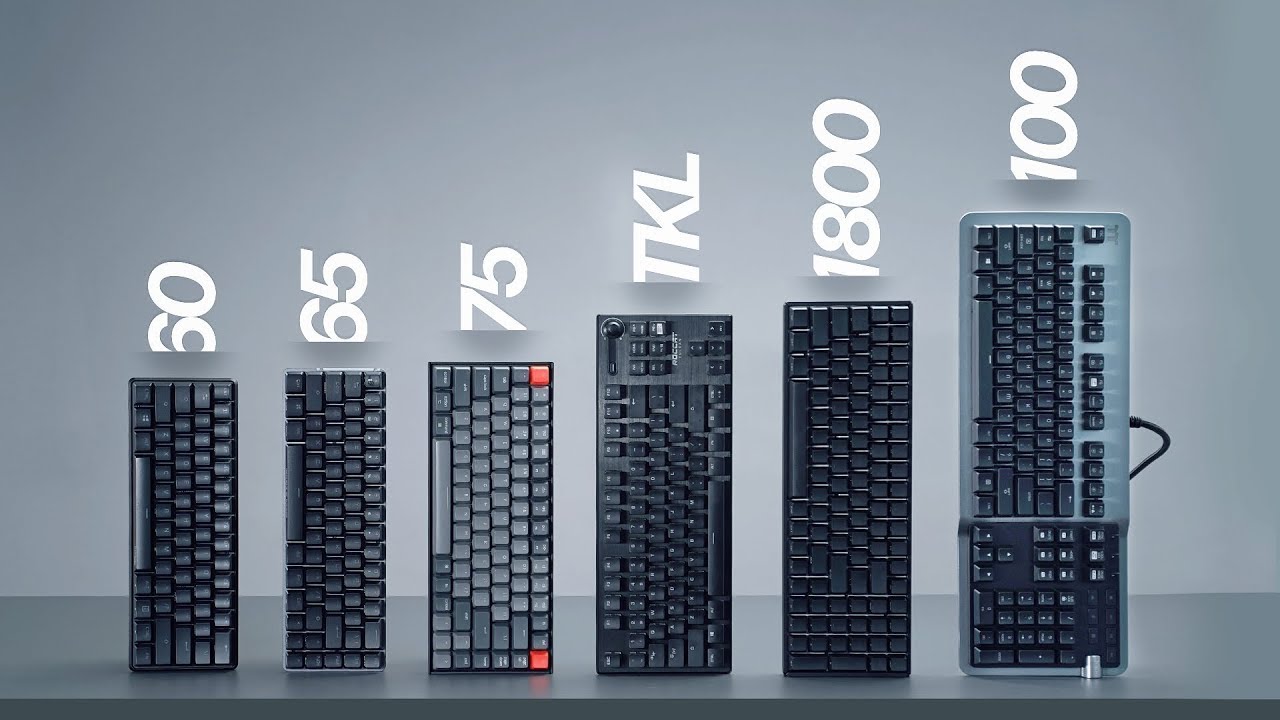
60% Keyboard – Ultra Minimal Setup
Design Overview
The 60% keyboard is the smallest mainstream mechanical keyboard layout. It typically includes around 61 keys, covering only the alphanumeric section and modifier keys. It removes the function row, arrow keys, and navigation cluster completely.
Because of this minimal design, users rely heavily on function layers (Fn key combinations) to access missing keys.
User Experience
The 60% keyboard is highly popular among FPS gamers and minimal desk setup enthusiasts. The compact size allows maximum mouse movement space, which is especially useful for low-sensitivity gaming styles.
It also creates a clean and clutter-free desk aesthetic, making it a favorite in modern setups and streaming environments.
Advantages
The biggest advantage of a 60% keyboard is portability. It is extremely lightweight and easy to carry, making it perfect for travel or small desks.
It is also highly customizable, as many models support QMK or VIA software for remapping keys.
Limitations
The learning curve is the biggest drawback. New users often struggle with missing arrow keys and function keys. Productivity tasks like editing documents or coding can feel slower until users fully adapt.
65% Keyboard – Balanced Compact Layout
Design Overview
The 65% keyboard improves on the 60% layout by adding dedicated arrow keys and a small navigation column (Delete, Page Up, Page Down, Home, End). It usually has around 67–68 keys.
It does not include the function row, but navigation becomes much easier compared to a 60% keyboard.
User Experience
This layout is often called the “sweet spot” between functionality and compactness. It is widely used by writers, developers, and casual gamers who want efficiency without sacrificing essential keys.
The presence of arrow keys significantly improves usability for everyday tasks like browsing, editing, and coding.
Advantages
The main advantage is usability. You get essential navigation keys without losing too much desk space.
It also offers a smoother transition for users coming from full-size keyboards.
Limitations
The biggest limitation is the missing function row. Users still need Fn combinations for F1–F12 keys, which can slow down workflows like programming or spreadsheet management.
Keycap compatibility can also be slightly limited due to non-standard key sizes.
75% Keyboard Productivity Focused Compact Layout
Design Overview
The 75% keyboard is the most functional compact layout. It includes around 82–84 keys, featuring arrow keys, a navigation cluster, and a full function row.
Despite having more keys, it is still smaller than a full-size keyboard due to tightly packed design and reduced spacing.
User Experience
This layout feels very close to a full-size keyboard but in a more compact form. It is especially useful for programmers, office workers, and content creators.
Users who rely on shortcuts in software like Excel, Photoshop, or coding environments benefit greatly from the dedicated function row.
Advantages
The biggest advantage is productivity. You do not need to rely on Fn layers for most tasks, which improves speed and efficiency.
It also reduces the adjustment period compared to smaller layouts.
Limitations
The only downside is slightly reduced portability. While still compact, it is larger than 60% and 65% keyboards, making it less ideal for ultra-minimal setups or frequent travel.
Key Differences Between 60% vs 65% vs 75% Keyboard
The main difference between these layouts lies in functionality, size, and ease of use.
A 60% keyboard focuses on minimalism and portability. A 65% keyboard improves usability by adding arrow keys. A 75% keyboard prioritizes productivity with a full function row.
As layout size increases, usability improves but portability slightly decreases.
The learning curve also changes significantly. The 60% keyboard requires the most adaptation, while the 75% keyboard feels the most natural for users coming from full-size keyboards.
Gaming Performance Comparison
For gaming, especially FPS titles, 60% and 65% keyboards are highly preferred. The compact size allows more mouse movement space, which is crucial for fast aiming and control.
However, for MMO and strategy games, the 75% keyboard performs better because it includes function keys that can be mapped to in-game abilities.
Ultimately, gaming performance depends more on preference than layout, but compact keyboards are generally favored for competitive play.
Productivity and Office Use
For office work and productivity, the 75% keyboard is the clear winner. It provides direct access to function keys, navigation keys, and shortcuts without requiring layers.
The 65% keyboard is also suitable for general work, especially for writers and developers who use arrow keys frequently.
The 60% keyboard is the least efficient for productivity tasks due to missing keys and reliance on shortcuts.
Which Keyboard Should You Choose?
Your ideal keyboard depends on your usage style.
If you prioritize gaming and portability, the 60% keyboard is the best option. If you want a balanced experience for both typing and gaming, the 65% keyboard is ideal. If your focus is productivity, coding, or office work, the 75% keyboard is the most practical choice.
There is no universal “best” keyboard only the best keyboard for your workflow.
Final Verdict
60%, 65%, and 75% keyboards each serve a unique purpose in the mechanical keyboard world. The 60% layout is perfect for minimal setups and competitive gaming. The 65% layout offers a balanced experience with better usability. The 75% layout provides maximum functionality in a compact form.
In 2026, these layouts continue to dominate because they offer flexibility, customization, and performance for different types of users. Choosing the right keyboard is not about following trends it is about improving your daily comfort and efficiency.
FAQs
Yes, 60% keyboards are excellent for gaming, especially for FPS titles. Their compact size provides more desk space for mouse movement, which is useful for low-sensitivity gamers. Many competitive players prefer 60% layouts because they create a cleaner and more focused setup.
A 65% keyboard is better for users who need dedicated arrow keys and easier navigation. It offers a balance between compact size and functionality, making it ideal for typing, coding, and casual gaming. However, users who prioritize portability and minimalism may still prefer a 60% keyboard.
75% keyboards are popular because they provide most of the functionality of a full-size keyboard while saving desk space. They include a dedicated function row, arrow keys, and navigation controls, making them perfect for productivity, programming, and office work.
The 75% keyboard is generally considered the best compact layout for programming. It offers direct access to function keys and navigation controls, which are commonly used in coding environments and development software.
For most users, the 65% keyboard is the best all-around option. It keeps a compact design while including essential keys like arrows and navigation buttons, making it suitable for gaming, typing, browsing, and daily productivity tasks.




- Be Respectful
- Stay Relevant
- Stay Positive
- True Feedback
- Encourage Discussion
- Avoid Spamming
- No Fake News
- Don't Copy-Paste
- No Personal Attacks
- Be Respectful
- Stay Relevant
- Stay Positive
- True Feedback
- Encourage Discussion
- Avoid Spamming
- No Fake News
- Don't Copy-Paste
- No Personal Attacks
