Mechanical Keyboard Switch Tester Guide: Types, Uses and Buying Tips
Published: 20 Jun 2026
If you have ever stood in a computer market in Lahore or scrolled through Daraz comparing Cherry MX Red against Gateron Yellow, you already know the real problem: a product photo cannot tell you how a switch feels under your finger. A Mechanical Keyboard Switch Tester Guide helps you understand why testing switches before buying can save you from choosing the wrong typing or gaming experience.
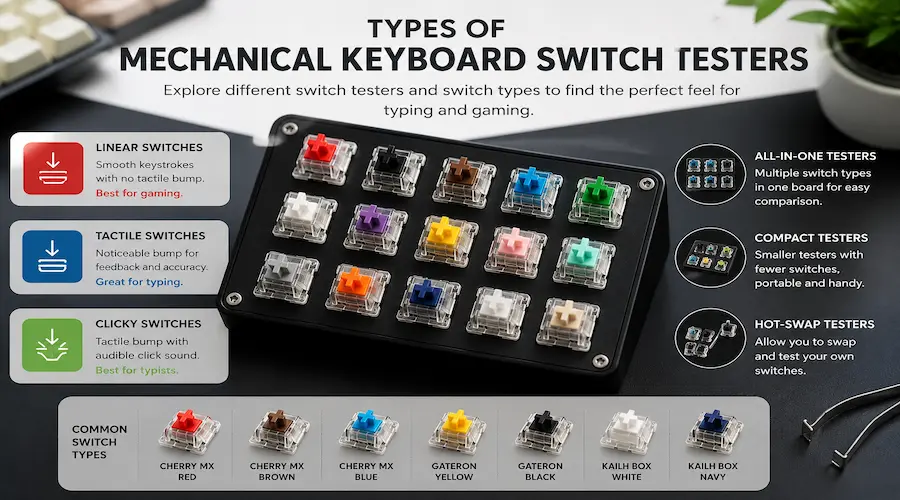
A mechanical keyboard switch tester solves exactly this problem. It lets you press, listen to, and compare individual switches before you spend money on a full keyboard or a hundred-piece switch set. This guide explains what a switch tester actually is, the different types available, how to use one properly, and where buyers in Pakistan can get one without overpaying on import duty.
What Is a Mechanical Keyboard Switch Tester Guide?
A mechanical keyboard switch tester is a small board or sample pack that holds a handful of individual key switches, usually without a full set of keycaps or a circuit board behind them. You press each switch directly to feel its actuation force, listen to its sound, and judge whether you prefer a smooth linear feel, a tactile bump, or an audible click. Builders use it before ordering switches in bulk, since buying forty five or more pieces of the wrong switch is an expensive mistake to undo.
This is different from a general keyboard tester, which is a free online tool that checks whether every key on an already assembled keyboard registers correctly. People sometimes use the two terms interchangeably, especially when they are trying to figure out why a specific key on their board feels off. Both tools matter, just for different jobs, and this guide covers both.
Types of Mechanical Keyboard Switch Tester Guide Explained
Before buying anything, it helps to know which type of switch tester actually matches your goal. The table below breaks down the three common options.
| Tester Type | Best For | Typical Cost (PKR) | Pros | Cons |
| Physical sample tester | Feeling real switches before buying a full set | 800 to 3,000 | Genuine hands-on feel and sound | Limited to switches included in the pack |
| DIY switch tester | Budget builders with spare switches | 200 to 600 | Cheapest option, fully customisable | Needs basic soldering or a spare PCB |
| Online diagnostic tool | Checking an existing keyboard for faulty keys | Free | Instant, no extra hardware needed | Cannot simulate the feel of a new switch |
How to Use a Physical Switch Tester Properly
Most people press a tester once, decide they like it, and move on. A more reliable approach takes a few extra minutes but saves you from buyer’s remorse later.
- Press each switch slowly first to feel the actuation point, then press it at normal typing speed.
- Pay attention to the release point as well as the press, since some switches feel different on the way up.
- Test in a quiet room if sound matters to you, since clicky switches can sound very different in a noisy office versus a quiet bedroom setup.
- Compare the same switch type across two or three brands, since a Gateron Yellow and a Cherry MX Yellow do not feel identical despite sharing a name.
- If you type for long hours, hold the switch down for a few seconds to judge finger fatigue, not just the first impression.
Linear vs Tactile vs Clicky: What You Will Feel When Testing
Every switch tester you try will fall into one of three families. Knowing the rough specifications ahead of time makes it much easier to judge what you are feeling.
| Switch Type | Actuation Force | Travel Distance | Sound Level | Best For | Common Examples |
| Linear | 45 to 60g | 4.0mm | Low to medium | Gaming, fast repeated presses | Cherry MX Red, Gateron Yellow |
| Tactile | 55 to 67g | 4.0mm | Low to medium | Typing with feedback, office use | Cherry MX Brown, Gateron Pro Brown |
| Clicky | 55 to 67g | 4.0mm | High | Typists who enjoy audible feedback | Cherry MX Blue, Kailh Box White |
For exact specification sheets and authorised switch data, Cherry’s official MX switch page remains one of the most reliable references, since third party listings sometimes round numbers or mix up generations.
Buying a Switch Tester in Pakistan
Switch testers are not yet common on local shop shelves, but a few practical routes work well for Pakistani buyers.
Daraz is usually the fastest option, with Gateron and Akko branded testers showing up under keyboard accessories. Prices typically range from around 800 rupees for a small four to nine switch sample card up to 3,000 rupees or more for a 20 to 35 switch board, depending on the seller and shipping origin.
In person, Hafeez Centre in Lahore and the computer markets around Saddar in Karachi occasionally stock small switch sample cards alongside keycap and switch sellers, though stock varies shop to shop, so it is worth calling ahead before making a trip.
For larger testers with 35 or more switches, importing directly from a switch manufacturer’s store such as Gateron’s official store is an option, but factor in customs duty and a longer delivery window of two to four weeks. Checking seller ratings and order count before paying is always worth the extra minute.
Building a DIY Switch Tester at Home
If you already own a few loose switches from old keyboard projects, you do not need to buy a dedicated tester at all. Pick up five to ten different switches from a local PC shop or Daraz, then mount them on a small switch tester PCB, available cheaply from the same sellers, or even press them into holes drilled in a thin wooden board for a no soldering option.
This route costs a fraction of a branded tester and works just as well for judging feel, even though it will not look as polished. For most home builders comparing two or three switch options before a single keyboard build, a DIY tester is the more practical choice.
Diagnosing Existing Switch Problems, Not Just Buying New Ones
Sometimes the question is not which switch to buy but why a switch already in your keyboard feels wrong. Chattering, where one press registers as two or three characters, a mushy feel that was not there before, or a key that has gone completely dead are the most common complaints.
Before assuming a single switch has failed, it helps to confirm whether the problem is limited to one key or affects the whole board. You can run a quick check across every key using our free Keyboard Tester tool, which highlights exactly which keys are responding and which ones are not, before you open up the board and start desoldering switches.
For builders who want to go further and measure exact force curves rather than rely on feel alone, Tom’s Hardware documented their force curve testing methodology using a texture analyzer, which is overkill for most hobbyists but useful background if you are curious how professional reviewers reach their numbers.
Conclusion
A mechanical keyboard switch tester removes the guesswork from one of the most personal decisions in a keyboard build: how the switches actually feel under your fingers. Whether you buy a branded sample pack from Daraz, pick up loose switches from a local market and build your own, or simply run a diagnostic check on a board you already own, the goal stays the same: know what you are getting before you commit. For most Pakistani buyers starting out, a small DIY tester or an affordable Daraz sample card covers nearly every use case without the wait or cost of importing a large branded set.
FAQs
Yes, even a small four or nine switch tester pays for itself if it stops you from buying forty five switches you end up disliking. A cheap DIY version works just as well for a single build.
A switch tester lets you feel individual switches before buying them. A keyboard tester is a free online tool that checks whether the keys on a keyboard you already own are registering correctly.
Yes, buying five to ten loose switches and mounting them on a small tester PCB or a drilled wooden board is a common and inexpensive DIY approach.
A small sample pack that includes one linear, one tactile, and one clicky switch, such as a Cherry MX Red, Brown, and Blue set, gives beginners a clear sense of the three main categories without overspending.
Most testers use a standard five pin or three pin mechanical switch socket, so switches from different brands generally fit the same tester board as long as the pin layout matches.




- Be Respectful
- Stay Relevant
- Stay Positive
- True Feedback
- Encourage Discussion
- Avoid Spamming
- No Fake News
- Don't Copy-Paste
- No Personal Attacks
- Be Respectful
- Stay Relevant
- Stay Positive
- True Feedback
- Encourage Discussion
- Avoid Spamming
- No Fake News
- Don't Copy-Paste
- No Personal Attacks
