Membrane Keyboards Explained: Pros, Cons & Why They’re Still Popular
Published: 2 May 2026
When choosing a keyboard, many users overlook membrane keyboards in favor of mechanical options. They remain one of the most widely used keyboard types in offices, schools, and even casual gaming setups. If you’re wondering whether they’re the right choice for you, this detailed guide covers everything from how they work to their advantages, limitations, and real-world use cases.
1. What Are Membrane Keyboards?
Membrane keyboards are one of the most commonly used input devices due to their simple design and cost efficiency. Unlike mechanical keyboards, they do not rely on individual switches under each key. Instead, they use a pressure-based system that registers keystrokes when layers within the keyboard make contact. This design makes them lightweight, affordable, and widely available across different devices, including laptops and office keyboards.
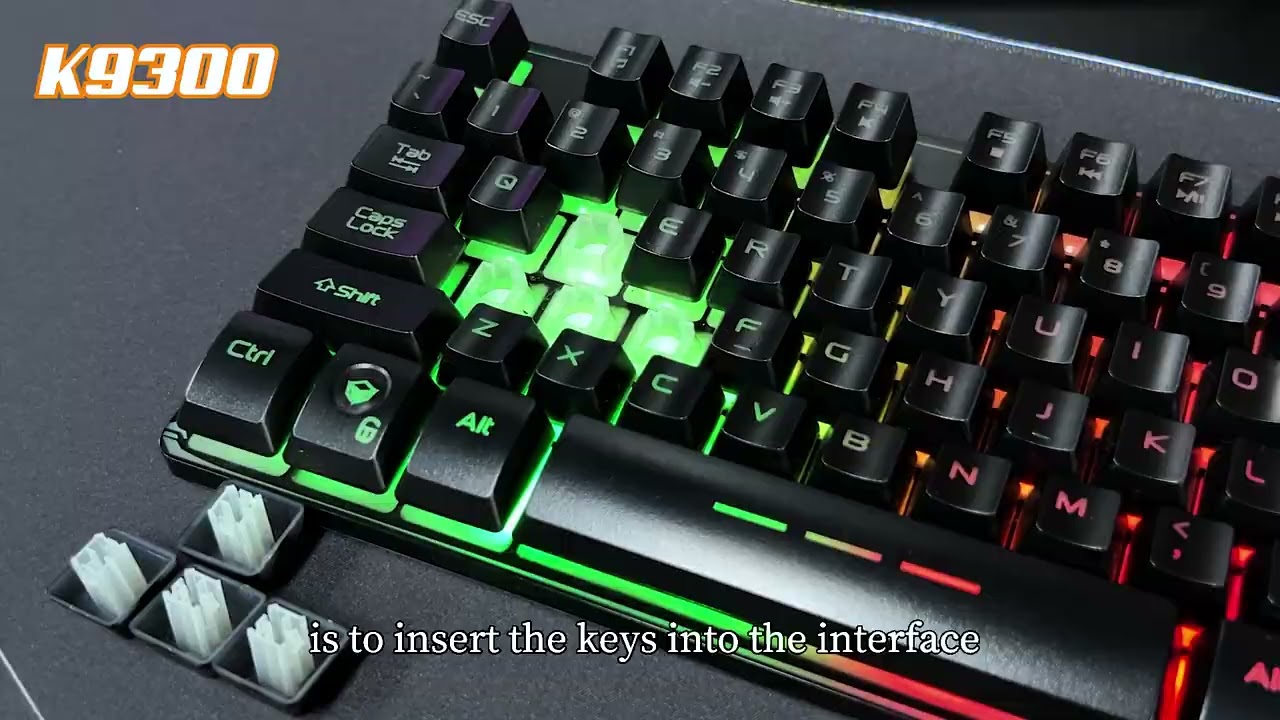
They are especially popular in environments where quiet typing and low cost are priorities. While they may not provide the tactile feedback of mechanical keyboards, they are still highly functional for everyday tasks like typing, browsing, and office work.
1.1 How Do Membrane Keyboards Work?
Membrane keyboards use three layers that press together when a key is pushed.
This contact completes an electrical circuit and sends a signal to the computer.
The rubber dome layer provides a soft, quiet typing experience.
2. Key Advantages of Membrane Keyboards Gaming
Membrane keyboards are preferred by millions of users because they offer a balance between performance and affordability. Their design focuses on simplicity, making them easy to manufacture and accessible for a wide range of users. From offices to educational institutions, they remain a practical choice for environments that require multiple keyboards at a lower cost.
Another major advantage is their quiet operation, which makes them ideal for shared workspaces. Additionally, their sealed design provides some level of protection against dust and minor spills, increasing their usability in everyday situations.
2.1 Cost-Effective Option
These keyboards are significantly cheaper than mechanical alternatives.
They are ideal for bulk purchases in offices and schools.
Budget users can get reliable performance at a low price.
2.2 Quiet Typing Experience
Membrane keyboards produce very little noise during typing.
The rubber dome design absorbs sound effectively.
They are perfect for offices, libraries, and shared spaces.
2.3 Spill & Dust Resistance
The layered design helps protect internal components.
They can handle minor spills better than open-switch keyboards.
Dust is less likely to affect performance.
3. Disadvantages You Should Know
Despite their benefits, membrane keyboards come with certain limitations that may affect performance for specific users. These drawbacks are more noticeable for professionals, gamers, or those who type extensively. Understanding these disadvantages can help you decide whether this keyboard type suits your needs.
While they are great for general use, users who require precision, speed, or customization may find them lacking. This is why many advanced users prefer mechanical keyboards for specialized tasks.
3.1 Typing Feel & Accuracy
Keys feel soft and less tactile compared to mechanical keyboards.
This can reduce typing speed for experienced users.
Some users may find the feedback less satisfying.
3.2 Shorter Lifespan
Membrane keyboards wear out faster over time.
The rubber dome layer loses responsiveness.
The average lifespan is lower than that of mechanical keyboards.
3.3 Limited Customization
They do not support switch replacement or upgrades.
Keycaps are difficult to remove or change.
Customization options are very limited.
4. Mechanical vs Membrane Keyboards (Quick Comparison)
When comparing keyboard types, the difference mainly comes down to performance, feel, and cost. Membrane keyboards are designed for affordability and quiet use, while mechanical keyboards focus on precision and durability. This makes each type suitable for different users depending on their needs.
Understanding this comparison is essential before making a purchase decision. If you prioritize comfort and budget, membrane keyboards are a solid choice, but for performance and customization, mechanical keyboards stand out.
| Feature | Membrane | Mechanical |
| Price | Low | High |
| Noise | Quiet | Loud |
| Lifespan | Medium | High |
| Typing Feel | Soft | Tactile |
| Gaming | Casual | Competitive |
5. Are Membrane Keyboards Good for Gaming?
Membrane keyboards can be used for gaming, but their performance depends on the type of games you play. They are generally suitable for casual gaming and users who are not focused on competitive performance. Their affordability also makes them attractive for beginner gamers.
However, they may not provide the speed and responsiveness required for high-level gaming. Features like key rollover and actuation speed are usually better in mechanical keyboards, which gives them an edge in competitive environments.
5.1 Gaming Performance Breakdown
Membrane keyboards have slower response times.
They offer limited key rollover support.
They may struggle with fast-paced gaming inputs.
5.2 When They Work Well
They are suitable for casual and story-based games.
Good option for beginner gamers on a budget.
Provide a decent experience for everyday gaming.
6. Are Membrane Keyboards Quiet?
One of the biggest advantages of membrane keyboards is their quiet operation. Unlike mechanical keyboards, which produce noticeable clicking sounds, membrane keyboards are designed to minimize noise. This makes them highly suitable for environments where silence is important.
They are commonly used in offices, libraries, and shared workspaces where loud typing can be distracting. If noise reduction is your priority, this keyboard type is an excellent choice.
7. Lifespan & Durability Explained
Durability is an important factor when choosing a keyboard. Membrane keyboards are designed for regular use but may not last as long as mechanical keyboards. Their lifespan depends on usage frequency and maintenance.
With proper care, they can serve users for several years without major issues. However, heavy usage may lead to faster wear of the internal rubber layers.
7.1 How Long Do Membrane Keyboards Last?
Most last between 3 and 5 years with regular use.
Heavy usage can reduce lifespan.
Proper care can extend durability.
7.2 Do Membrane Keyboards Last Longer?
They generally do not last longer than mechanical keyboards.
However, they are reliable for everyday use.
Good maintenance improves lifespan.
8. Do Membrane Keyboards Have Switches?
Membrane keyboards differ significantly from mechanical ones in terms of internal structure. Instead of using individual switches for each key, they rely on a unified pressure system. This is what makes them quieter and more compact.
This design also explains why they are less customizable and have a different typing feel. Understanding this helps users make better purchasing decisions.
9. Types of Membrane Keyboards
There are different types of membrane keyboards designed for specific use cases. Each type serves a unique purpose depending on the environment and user requirements. From standard office keyboards to specialized industrial designs, membrane keyboards offer versatility.
Choosing the right type depends on how and where you plan to use it. Some are optimized for durability, while others focus on aesthetics or gaming features.
9.1 Standard Membrane Keyboards
Commonly used in homes and offices.
Affordable and widely available.
Suitable for everyday tasks.
9.2 Flat-Panel Membrane Keyboards
Features a smooth, flat surface design.
Used in medical and industrial environments.
Easy to clean and maintain.
9.3 Gaming Membrane Keyboards
Designed with RGB lighting and styling.
Offer improved responsiveness for gaming.
Target budget gamers.
10. Who Should Use This Keyboard Type?
Membrane keyboards are not a one-size-fits-all solution, but they work well for specific groups of users. Their affordability and quiet operation make them appealing for many everyday scenarios.
Understanding who benefits the most from this keyboard type can help you make a smarter decision based on your needs and usage habits.
10.1 Best for Office Users
Ideal for quiet work environments.
Affordable for bulk purchasing.
Comfortable for daily tasks.
10.2 Best for Students
Budget-friendly and lightweight.
Easy to carry and use.
Suitable for study and assignments.
10.3 Best for Casual Gamers
Good for entry-level gaming setups.
Affordable compared to mechanical keyboards.
Decent performance for non-competitive games.
11. Can You Replace Keys or Customize?
Customization is limited in membrane keyboards due to their design. Unlike mechanical keyboards, they are not built for modifications or upgrades. This makes them less appealing to enthusiasts but still practical for general users.
Understanding these limitations is important before purchasing, especially if customization is a priority for you.
11.1 Can the Keys Be Replaced?
Most models do not support key replacement.
Keys are integrated into the membrane layer.
Replacement usually requires a new keyboard.
11.2 Are They Hot Swappable?
Membrane keyboards are not hot swappable.
They lack individual switches for replacement.
Customization options are minimal.
12. Best Membrane Keyboards (Buying Guide)
Buying the right keyboard requires understanding your needs and preferences. Membrane keyboards prices depend on various designs, making it important to choose wisely. Factors like comfort, durability, and brand reputation should guide your decision.
With many options available in the U.S. market, users can easily find a model that fits their budget and requirements.
12.1 Where Can You Buy?
Available on major online platforms like Amazon.
Also sold in retail stores like Walmart and Best Buy.
Easy to find in electronics shops.
12.2 What to Look For
Check build quality and key comfort.
Choose a trusted brand.
Look for warranty and durability.
13. Quick Pros & Cons Summary
Membrane keyboards offer a balance between affordability and usability. They are not designed for high-end performance but provide reliable functionality for everyday users. Understanding their strengths and weaknesses helps in making an informed decision.
Conclusion
Membrane keyboards remain a smart choice for users who value affordability, quiet performance, and simplicity. While they may not match the speed and customization of mechanical keyboards, they are highly reliable for everyday use. Whether you’re working, studying, or gaming casually, they provide a practical solution without stretching your budget.
FAQs
A membrane keyboard is a type of keyboard that uses a soft rubber membrane layer to register key presses.
It is known for being quiet, lightweight, and more affordable than mechanical keyboards.
Membrane keyboards are commonly used for office work, students, and everyday typing tasks.
Yes, they are ideal for office work, students, and users who prefer quiet and affordable keyboards.
A membrane keyboard uses a soft rubber layer for key presses, making it quieter and more affordable.
A “normal keyboard” usually refers to a mechanical keyboard, which uses individual switches for each key.
Mechanical keyboards feel more responsive and durable, while membrane keyboards are softer and quieter.
The four main types of keyboards are membrane, mechanical, wireless, and ergonomic keyboards.
Each type offers different features like typing feel, portability, and comfort.
Choosing the right keyboard depends on your needs, such as gaming, office work, or everyday use.
Yes, membrane keyboards are generally quieter than mechanical keyboards because they use soft rubber layers instead of hard switches.
They produce less noise when typing, making them ideal for offices, students, and shared spaces.
If you want a silent typing experience, membrane keyboards are a better choice than mechanical ones.




- Be Respectful
- Stay Relevant
- Stay Positive
- True Feedback
- Encourage Discussion
- Avoid Spamming
- No Fake News
- Don't Copy-Paste
- No Personal Attacks
- Be Respectful
- Stay Relevant
- Stay Positive
- True Feedback
- Encourage Discussion
- Avoid Spamming
- No Fake News
- Don't Copy-Paste
- No Personal Attacks
