Best Keyboard Switches for Typing and Productivity (Ultimate Guide)
Published: 28 Apr 2026
Most people think their slow typing is just because they haven’t practised enough. Few ever consider that the switches under their fingers might be the actual problem.
If your hands feel tired after two hours of writing, if you are making more errors than usual during long coding sessions, or if your keyboard feels stiff and unresponsive during note-taking, your switches are working against you.
The right keyboard switch changes all of that. This guide covers the best keyboard switches for typing and productivity based on your work type, environment, and budget. No filler just what you actually need to know.
Best Keyboard Switches for Typing and Productivity Explained
Keyboard switches are the mechanical components under each keycap. Every keypress activates a switch, which sends the input to your computer. For typing, three things define your experience:
- Actuation force: how much finger pressure triggers the key. Lighter switches reduce fatigue during long sessions.
- Actuation point: how far the key travels before registering. Shorter travel means faster input but more accidental keypresses.
- Feedback type: whether you feel a bump, hear a click, or get a smooth, silent press.
For typing, comfort and accuracy matter far more. A switch that feels great for an hour can destroy your hands over a full workday if it is the wrong type.
4 Types of Mechanical Keyboard Switches for Typing and Productivity
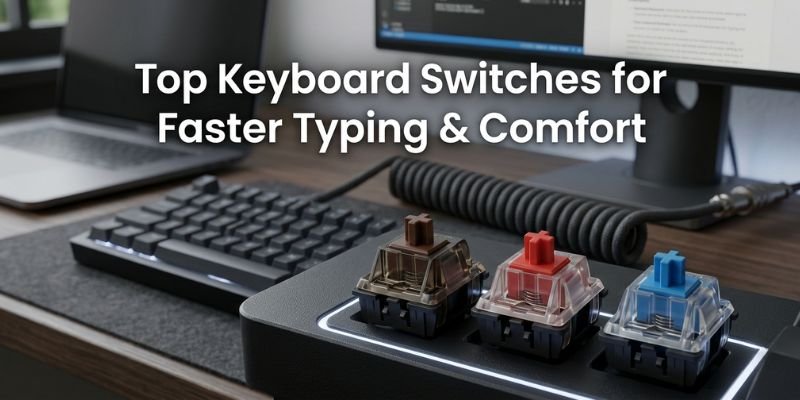
Tactile Switches
Tactile switches have a physical bump at the actuation point. When your finger feels that bump, the key has registered you do not need to press all the way down.
This bump is the most important feature for typing productivity. It trains your fingers to stop at the right point rather than bottoming out every single keystroke. Less bottoming out means dramatically less finger fatigue over a long session.
- Feel: Bumpy, quiet
- Best for: Writers, programmers, students, office workers
- Top picks: Cherry MX Brown, Gateron Brown, ZealPC Zealios V2
Tactile switches are the number one recommendation for typing productivity across almost every professional context. The feedback loop they create actively improves typing technique over time.
Linear Switches
Best Linear switches travel smoothly from top to bottom with no bump and no click. The actuation happens at a defined point, but your fingers receive no physical signal when it occurs.
Experienced typists with strong muscle memory often prefer linear switches for their smooth, uninterrupted feel. The problem for most people is that without tactile feedback, bottoming out becomes habitual, which increases fatigue significantly during long typing sessions.
- Feel: Smooth, very quiet
- Best for: Fast, experienced typists, long-session productivity with proper technique
- Top picks: Gateron Yellow, Cherry MX Red, Gateron Red
Linear switches for productivity make the most sense once your typing habits are fully developed. For beginners and intermediate typists, tactile switches are the safer and more comfortable starting point.
Clicky Switches
Clicky switches combine a tactile bump with an audible click at the actuation point. They are the most satisfying switch type for many typists and the least practical in shared environments.
The dual feedback of clicky switches genuinely improves accuracy. Your fingers feel the keypress, and your ears confirm it simultaneously. Writers and coders who work alone at home frequently report that clicky switches improve their typing rhythm and overall output quality.
- Feel: Bumpy, loud
- Best for: Solo home office users, private workspaces
- Top picks: Cherry MX Blue, Kailh Box White, Razer Green
The honest limitation is noise. Clicky switches in an open office, a dorm room, or a shared home space are genuinely disruptive. If your environment allows it, they are excellent. If it does not, they are impractical regardless of how good they feel.
Silent Switches
Silent switches are standard linear or tactile switches with internal rubber dampeners that absorb keystroke sound. The result is near-whisper operation with the feel of a mechanical keyboard.
- Feel: Smooth or lightly tactile, near-silent
- Best for: Open offices, shared home workspaces, video call-heavy work
- Top picks: Cherry MX Silent Red, Gateron Silent Yellow, Topre Silent
Silent switches have become essential for remote workers who spend hours on video calls. Mechanical keyboard noise bleeding into the microphone audio during professional calls is a real workplace problem that silent switches solve directly.
Best Keyboard Switches for Long Typing Sessions
Long typing sessions: three or more consecutive hours of writing, coding, or data entry: require one thing above all else: low fatigue.
Two factors cause typing fatigue. First, a heavy actuation force requires too much finger pressure per keystroke. Second, bottoming out on every press creates repeated physical impact that adds up over thousands of keypresses.
The best low-fatigue keyboard switches address both:
- Gateron Yellow at 35g: the lightest mainstream switch available. Minimal force required per keystroke, smooth linear travel, very quiet. Best choice for pure fatigue reduction.
- Gateron Brown at 45g: light tactile bump that trains fingers not to bottom out. Best balance of comfort and feedback for extended writing.
- Cherry MX Silent Red at 45g: light linear with dampening. Excellent for long sessions in quiet environments.
- Topre 45g: the premium choice. Electrostatic capacitive mechanism that feels unlike any standard mechanical switch. Widely considered the most comfortable typing experience available for all-day professional use.
A freelance writer producing four thousand words daily reported that switching from Cherry MX Blue to Gateron Brown reduced hand fatigue enough to extend their productive writing window by nearly an hour per day. That is not a small quality-of-life improvement it is a measurable productivity gain.
Best Keyboard Switches for Programmers
Programming has different typing demands than writing. Programmers type in deliberate bursts a function name, a pause to think, a block of logic, another pause. This rhythm means sustained rapid typing fatigue is less of a concern than accuracy and all-day comfort during deep focus work.
The best keyboard switches for programmers prioritise:
- Tactile accuracy feedback that confirms each keypress and reduces variable name errors
- Comfortable actuation force for eight to ten-hour working days
- Quiet enough operation for office environments or home offices shared with family
Top recommendations for programming:
- Cherry MX Brown: the classic programmer switch. Tactile bump confirms each keypress without clicky noise. Reliable, widely available, and proven across years of professional daily use.
- Gateron Brown: smoother than Cherry MX Brown with comparable tactile characteristics. Slightly more affordable, excellent for programmers building budget-conscious setups.
- ZealPC Zealios V2: sharper, more pronounced tactile bump than Cherry MX Brown. Preferred by programmers who want stronger per-key confirmation during precise coding work.
- Topre 45g: the premium programming investment. Found in Happy Hacking Keyboard and Realforce boards, widely considered the best switch available for all-day professional typing comfort.
Real scenario: A backend developer debugging a complex codebase for six hours needs switches that confirm each keypress accurately without the noise that would make open-office work disruptive to colleagues. Cherry MX Brown handles this exact requirement reliably.
Tactile vs Linear Switches for Typing Clear Comparison
This is the most common question from people buying their first mechanical keyboard for productivity use. Here is the direct answer.
Tactile switches give you a physical bump that signals keypress registration. For typing, this bump serves as a natural stopping point that reduces bottoming out and its associated fatigue. They work well across different typing speeds and experience levels. They are the better starting point for most people.
Linear keyboard switch types give you a completely smooth keystroke with no bump and no signal. For experienced typists with consistent muscle memory, this smoothness is genuinely preferred. For developing typists, the absence of feedback typically leads to more bottoming out and more fatigue during long sessions.
| Factor | Tactile | Linear |
| Feedback | Physical bump | None |
| Long Session Fatigue | Lower for most users | Higher without technique |
| Accuracy for Beginners | Better | Harder |
| Accuracy for Experienced Typists | Good | Excellent |
| Noise Level | Quiet | Very quiet |
| Best for | Writers, programmers, students | Fast experienced typists |
Start with tactile switches. If, after several months of use, you find the bump interrupts your typing flow, move to linear. Most people stay with tactile permanently.
Best Switches for Students
Students have three specific requirements that separate their needs from those of office professionals.
Budget is real. Most students cannot spend on premium setups and should not have to. Excellent typing switches are available at every price point, including under $40 for a complete keyboard.
Noise matters constantly. Dorm rooms, libraries, classrooms, and shared study spaces all require quiet operation. Clicky switches create genuine problems in all of these environments.
Long note-taking sessions during lectures and study periods need comfortable, low-fatigue switches that keep up with spoken content without causing hand strain.
Best switches for students:
- Gateron Brown: the top student recommendation. Quiet tactile feedback, light actuation, and a budget-friendly price in keyboards starting around fifty dollars.
- Outemu Brown: the most affordable tactile switch available. Found in keyboards under forty dollars. Not premium quality, but significantly better than laptop keyboards for assignment writing and study sessions.
- Cherry MX Silent Red: excellent for dorm room use where near-silent operation matters. Light and comfortable for long lecture note-taking.
- Akko CS Jelly switches: newer budget option gaining popularity in USA student communities for smooth feel at accessible price points.
When you’re taking notes in a long two-hour lecture, you need a keyboard switch that can keep up without making your hands tired or creating noise that distracts others. Gateron Brown switches do this really well and they’re also budget-friendly.
Full Comparison Table Typing Switch Guide
| Switch Type | Typing Comfort | Noise Level | Accuracy | Best Use Case |
| Tactile | Excellent | Quiet | Excellent | Writing, programming, and general typing |
| Linear | Good to Excellent | Very Quiet | Good for experienced users | Fast typists, productivity workflow |
| Clicky | Excellent | Loud | Excellent | Solo home office, private workspace |
| Silent Linear | Good | Near Silent | Good | Open offices, remote work calls |
| Silent Tactile | Excellent | Near Silent | Excellent | Office with feedback preference |
Top Switch Brands for Typing USA Buyer Guide
Cherry MX: The industry standard. Cherry MX Brown remains the most recommended typing switch globally. Consistent quality, wide availability in the USA retail, proven long-term reliability.
Gateron: Smoother than Cherry MX out of the box, more affordable, excellent value. Gateron Brown and Gateron Yellow are community favourites for typing productivity at accessible price points.
Topre: Premium electrostatic capacitive switches found in Happy Hacking Keyboard and Realforce boards. Widely considered the best typing experience available. Significant price premium that serious professionals find worthwhile.
Kailh: Box switch design offers better dust and moisture resistance than standard switches. Kailh Box Brown is a reliable tactile alternative with a slightly different bump character than Cherry MX.
Logitech: GX Brown and GX Red switches in Logitech’s keyboard lineup. Reliable performance with strong USA warranty support, popular in corporate office procurement.
Akko: Strong value option gaining ground in USA communities. CS switch line delivers smooth performance at prices significantly below Cherry MX. Best budget recommendation for students and first-time mechanical keyboard buyers.
Outemu: Most affordable switches available. Found in keyboards under forty dollars. Entry-level quality but a meaningful introduction to mechanical keyboard typing for budget-constrained buyers.
How to Choose the Right Typing Switch Practical Buying Guide
Four questions determine the right switch for your situation.
How many hours per day do you type?
Under two hours most switches work well at this volume. Two to four hours prioritise light actuation and tactile feedback. Over four hours Gateron Brown, Cherry MX Brown, or Topre 45g specifically for fatigue management.
What is your workspace environment?
Private home office any switch type works, including clicky. Open office or shared workspace silent switches are the professional choice. Library, classroom, or dorm silent linear or quiet tactile only.
What is your typing experience level?
New to mechanical keyboard tactile switches provide feedback that develops proper technique. Experienced typist linear switches become a genuine option worth considering. Unsure Cherry MX Brown covers the full range without compromising either direction.
What is your budget?
Under forty dollars keyboard Outemu Brown or Gateron switches in budget keyboards. Forty to one hundred dollars. Gateron Brown or Cherry MX Brown-equipped keyboards. Over one hundred dollars Cherry MX premium keyboards, Topre options, or custom switch builds.
Pros and Cons of Each Switch Type for Typing
Tactile Switches
Pros:
- Physical bump reduces bottoming out and finger fatigue across long sessions
- Improves keystroke accuracy for most typing speeds and experience levels
- Quiet enough for most shared environments, including offices and classrooms
- Best starting point for new mechanical keyboard users
Cons:
- A bump creates slight resistance that some fast typists find disruptive to flow
- Heavier tactile options can cause fatigue for users with a naturally light touch
Linear Switches
Pros:
- Smooth, consistent feel preferred by experienced fast typists
- Very quiet operation suitable for noise-sensitive environments
- Ultra-light options like Gateron Yellow significantly reduce force requirements
- Excellent for productivity typing once muscle memory is fully developed
- best keyboard switches for gaming
Cons:
- No tactile feedback increases bottoming out frequency for most users
- Bottoming out causes more long-session fatigue than tactile alternatives
- Less forgiving for users still developing typing techniques and habits
Clicky Switches
Pros:
- Most complete feedback of any switch type physical bump and audio confirmation together
- Creates a satisfying typing rhythm that many writers and coders genuinely enjoy
- Excellent accuracy improvement for users who respond well to audio confirmation
Cons:
- Too loud for offices, libraries, dorm rooms, and shared workspaces
- Heavier actuation force on most clicky options increases long-session fatigue
- Microphone bleed during video calls makes them impractical for remote workers
Silent Switches
Pros:
- Near-silent operation suitable for any professional or shared environment
- Maintains full mechanical keyboard feel and durability over membrane alternatives
- Essential for remote workers on frequent video calls with open microphones
Cons:
- Dampening material slightly alters keystroke feel compared to non-silent equivalents
- Some users find the dampened feel less satisfying during extended typing sessions
- Premium silent options carry a higher price than equivalent standard switch variants
Conclusion
Your keyboard switch affects every hour you spend at your desk. The wrong one drains your energy, slows your accuracy, and makes long work sessions genuinely uncomfortable. The right one disappears under your fingers and lets your work flow without physical interruption.
Here is the simplified keyboard switches for typing and productivity:
- Best overall typing switch: Cherry MX Brown for reliability, Gateron Brown for value
- Best for long typing sessions: Gateron Brown or Topre 45g
- Best for programmers: Cherry MX Brown or Topre 45g
- Best for students: Gateron Brown or Cherry MX Silent Red
- Best for open offices and remote work: Cherry MX Silent Red or Gateron Silent Yellow
- Best for solo home use: Cherry MX Blue for full clicky feedback
- Best for experienced fast typists: Gateron Yellow for ultra-light linear feel
Start with a tactile switch if you are unsure. Cherry MX Brown or Gateron Brown will serve the majority of typists well from day one without requiring any adjustment period.
Your daily productivity is shaped by the tools you use every day. A better keyboard switch is one of the smallest investments with one of the most consistent returns on comfort, accuracy, and output. Make the change your hands will notice the difference within the first week.
FAQs
Gateron Brown and Cherry MX Brown are the top recommendations for long typing sessions. Their light tactile bump trains fingers to stop at the actuation point rather than bottoming out, which directly reduces hand fatigue. For the premium option, Topre 45g is widely considered the most comfortable all-day typing switch available. Gateron Yellow at 35g is the best choice for users who prefer linear switches and want the lightest possible actuation force.
Cherry MX Brown is the most widely recommended switch for programmers. The tactile bump confirms each keypress accurately and reduces keystroke errors in code without the disruptive noise of clicky switches. Gateron Brown offers comparable performance at a lower price. For programmers willing to invest in a premium experience, Topre 45g keyboards like the Happy Hacking Keyboard are considered the best all-day programming typing experience available.
For most typists, yes. Tactile switches reduce bottoming out through physical feedback, which lowers fatigue and improves accuracy during long sessions. Linear switches are better suited to experienced typists with fully developed muscle memory who prefer smooth, uninterrupted keystrokes. If you are new to mechanical keyboards or type for several hours daily, start with tactile switches Cherry MX Brown or Gateron Brown cover most needs effectively.
Cherry MX Silent Red and Gateron Silent Yellow are the top recommendations for office environments. Both operate at near-whisper volume levels while maintaining the durability and feel advantages of mechanical keyboards over membrane alternatives. For users who want tactile feedback with quiet operation, Cherry MX Silent switches in tactile variants combine both requirements in a single package suitable for professional open-plan workspaces.
Gateron Yellow at 35g addresses force fatigue with the lightest actuation of any mainstream switch. Cherry MX Brown and Gateron Brown address bottoming out fatigue through tactile feedback that creates a natural keystroke stopping point. For maximum fatigue reduction, combining both factors, Gateron Brown represents the best practical balance. Topre 45g is the premium option that many professional typists consider the most fatigue-resistant switch available for all-day use.
The quietest keyboard switches are usually Red or Silent Red because they have a smooth and soft keystroke. They don’t make a loud clicking sound like Blue switches, making them ideal for quiet environments. If you want even less noise, Silent switches are the best option for minimal sound.




- Be Respectful
- Stay Relevant
- Stay Positive
- True Feedback
- Encourage Discussion
- Avoid Spamming
- No Fake News
- Don't Copy-Paste
- No Personal Attacks
- Be Respectful
- Stay Relevant
- Stay Positive
- True Feedback
- Encourage Discussion
- Avoid Spamming
- No Fake News
- Don't Copy-Paste
- No Personal Attacks
